<?xml version="1.0" encoding="utf-8"?>
<feed xmlns="http://www.w3.org/2005/Atom">
  <title>Michael Stapelbergs Website: posts tagged debug</title>
  <link href="https://michael.stapelberg.ch/posts/tags/debug/feed.xml" rel="self"/>
  <link href="https://michael.stapelberg.ch/posts/tags/debug/"/>


  <id>https://michael.stapelberg.ch/posts/tags/debug/</id>
  <generator>Hugo -- gohugo.io</generator>
  <entry>
    <title type="html"><![CDATA[Tips to debug hanging Go programs]]></title>
    <link href="https://michael.stapelberg.ch/posts/2025-02-27-debug-hanging-go-programs/"/>
    <id>https://michael.stapelberg.ch/posts/2025-02-27-debug-hanging-go-programs/</id>
    <published>2025-02-27T17:51:38+01:00</published>
    <content type="html"><![CDATA[<p>I was helping someone get my <a href="https://github.com/gokrazy/rsync">gokrazy/rsync</a>
implementation set up to synchronize <a href="https://en.wikipedia.org/wiki/Resource_Public_Key_Infrastructure">RPKI
data</a> (used
for securing BGP routing infrastructure), when we discovered that with the right
invocation, my rsync receiver would just hang indefinitely.</p>
<p>This was a quick problem to solve, but in the process, I realized that I should
probably write down a few Go debugging tips I have come to appreciate over the
years!</p>
<h2 id="scenario-hanging-go-program">Scenario: hanging Go program</h2>
<p>If you want to follow along, you can reproduce the issue by building an older
version of gokrazy/rsync, just before the bug fix commit (you’ll need <a href="https://go.dev/dl/">Go 1.22
or newer</a>):</p>
<pre tabindex="0"><code>git clone https://github.com/gokrazy/rsync
cd rsync
git reset --hard 6c89d4dda3be055f19684c0ed56d623da458194e^
go install ./cmd/...
</code></pre><p>Now we can try to sync the repository:</p>
<pre tabindex="0"><code>% gokr-rsync \
  -rtO \
  --delete \
  rsync://rsync.paas.rpki.ripe.net/repository/ \
  /tmp/rpki-repo
[…]
2025/02/08 09:35:10 Opening TCP connection to rsync.paas.rpki.ripe.net:873
2025/02/08 09:35:10 rsync module &#34;repo&#34;, path &#34;repo/&#34;
2025/02/08 09:35:10 (Client) Protocol versions: remote=31, negotiated=27
2025/02/08 09:35:10 Client checksum: md4
2025/02/08 09:35:10 sending daemon args: [--server --sender -tr . repo/]
2025/02/08 09:35:10 exclusion list sent
2025/02/08 09:35:10 receiving file list
2025/02/08 09:35:11 [Receiver] i=0 ? . mode=40755 len=4096 uid=0 gid=0 flags=?
[…]
2025/02/08 09:35:11 [Receiver] i=89 ? clonoth/1/3139332e33322e3130302e302f32342d3234203d3e203537313936.roa mode=100644 len=1747 uid=0 gid=0 flags=?
</code></pre><p>…and then the program just sits there.</p>
<h2 id="sigquit-stack-trace">Tip 1: Press Ctrl+\ (SIGQUIT) to print a stack trace</h2>
<p>The easiest way to look at where a Go program is hanging is to press <code>Ctrl+\</code>
(backslash) to <a href="https://en.wikipedia.org/wiki/Signal_(IPC)#SIGQUIT">make the terminal send it a <code>SIGQUIT</code>
signal</a>. When the Go runtime
receives <code>SIGQUIT</code>, it prints a stack trace to the terminal before exiting the
process. This behavior is enabled by default and can be customized via the
<code>GOTRACEBACK</code> environment variable, see the <a href="https://pkg.go.dev/runtime"><code>runtime</code> package
docs</a>.</p>
<p>Here is what the output looks like in our case. I have made the font small so
that you can recognize the shape of the output (the details are not important,
continue reading below):</p>
<div style="font-size: 60%">
<pre tabindex="0"><code>^\SIGQUIT: quit
PC=0x47664e m=0 sigcode=128

goroutine 0 gp=0x6e6020 m=0 mp=0x6e6ec0 [idle]:
internal/runtime/syscall.Syscall6()
	/home/michael/sdk/go1.23.0/src/internal/runtime/syscall/asm_linux_amd64.s:36 +0xe fp=0x7ffc58665090 sp=0x7ffc58665088 pc=0x47664e
internal/runtime/syscall.EpollWait(0x586651e0?, {0x7ffc5866511c?, 0x3000000018?, 0x7ffc586651f0?}, 0x58665110?, 0x7ffc?)
	/home/michael/sdk/go1.23.0/src/internal/runtime/syscall/syscall_linux.go:32 +0x45 fp=0x7ffc586650e0 sp=0x7ffc58665090 pc=0x4765e5
runtime.netpoll(0xc0000000c0?)
	/home/michael/sdk/go1.23.0/src/runtime/netpoll_epoll.go:116 +0xd2 fp=0x7ffc58665768 sp=0x7ffc586650e0 pc=0x432332
runtime.findRunnable()
	/home/michael/sdk/go1.23.0/src/runtime/proc.go:3580 +0x8c5 fp=0x7ffc586658e0 sp=0x7ffc58665768 pc=0x43f045
runtime.schedule()
	/home/michael/sdk/go1.23.0/src/runtime/proc.go:3995 +0xb1 fp=0x7ffc58665918 sp=0x7ffc586658e0 pc=0x4405b1
runtime.park_m(0xc0000061c0)
	/home/michael/sdk/go1.23.0/src/runtime/proc.go:4102 +0x1eb fp=0x7ffc58665970 sp=0x7ffc58665918 pc=0x4409cb
runtime.mcall()
	/home/michael/sdk/go1.23.0/src/runtime/asm_amd64.s:459 +0x4e fp=0x7ffc58665988 sp=0x7ffc58665970 pc=0x470e2e

goroutine 1 gp=0xc0000061c0 m=nil [IO wait]:
runtime.gopark(0x452658?, 0x0?, 0x98?, 0xb3?, 0xb?)
	/home/michael/sdk/go1.23.0/src/runtime/proc.go:424 +0xce fp=0xc0000eb358 sp=0xc0000eb338 pc=0x46bc0e
runtime.netpollblock(0x4a01b8?, 0x4058e6?, 0x0?)
	/home/michael/sdk/go1.23.0/src/runtime/netpoll.go:575 +0xf7 fp=0xc0000eb390 sp=0xc0000eb358 pc=0x4318f7
internal/poll.runtime_pollWait(0x7ef586628808, 0x72)
	/home/michael/sdk/go1.23.0/src/runtime/netpoll.go:351 +0x85 fp=0xc0000eb3b0 sp=0xc0000eb390 pc=0x46af05
internal/poll.(*pollDesc).wait(0xc0000ce180?, 0xc00020e99c?, 0x0)
	/home/michael/sdk/go1.23.0/src/internal/poll/fd_poll_runtime.go:84 +0x27 fp=0xc0000eb3d8 sp=0xc0000eb3b0 pc=0x4b0ce7
internal/poll.(*pollDesc).waitRead(...)
	/home/michael/sdk/go1.23.0/src/internal/poll/fd_poll_runtime.go:89
internal/poll.(*FD).Read(0xc0000ce180, {0xc00020e99c, 0x4, 0x4})
	/home/michael/sdk/go1.23.0/src/internal/poll/fd_unix.go:165 +0x27a fp=0xc0000eb470 sp=0xc0000eb3d8 pc=0x4b17da
net.(*netFD).Read(0xc0000ce180, {0xc00020e99c?, 0x6eeea0?, 0x1?})
	/home/michael/sdk/go1.23.0/src/net/fd_posix.go:55 +0x25 fp=0xc0000eb4b8 sp=0xc0000eb470 pc=0x4f7e85
net.(*conn).Read(0xc000206000, {0xc00020e99c?, 0xc000212000?, 0x6e6ec0?})
	/home/michael/sdk/go1.23.0/src/net/net.go:189 +0x45 fp=0xc0000eb500 sp=0xc0000eb4b8 pc=0x5001a5
net.(*TCPConn).Read(0x0?, {0xc00020e99c?, 0xc0000eb568?, 0x46d449?})
	&lt;autogenerated&gt;:1 +0x25 fp=0xc0000eb530 sp=0xc0000eb500 pc=0x50bb25
io.ReadAtLeast({0x5d9640, 0xc000206000}, {0xc00020e99c, 0x4, 0x4}, 0x4)
	/home/michael/sdk/go1.23.0/src/io/io.go:335 +0x90 fp=0xc0000eb578 sp=0xc0000eb530 pc=0x4957d0
io.ReadFull(...)
	/home/michael/sdk/go1.23.0/src/io/io.go:354
encoding/binary.Read({0x5d9640, 0xc000206000}, {0x5da8b0, 0x7059a0}, {0x55e7c0, 0xc0000eb6a0})
	/home/michael/sdk/go1.23.0/src/encoding/binary/binary.go:244 +0xa5 fp=0xc0000eb670 sp=0xc0000eb578 pc=0x5102a5
github.com/gokrazy/rsync/internal/rsyncwire.(*MultiplexReader).ReadMsg(0xc00020a100)
	/home/michael/kr/rsync/internal/rsyncwire/wire.go:50 +0x48 fp=0xc0000eb6e8 sp=0xc0000eb670 pc=0x514428
github.com/gokrazy/rsync/internal/rsyncwire.(*MultiplexReader).Read(0x7ef5869b9a68?, {0xc000280000, 0x40000, 0x4dd4fb?})
	/home/michael/kr/rsync/internal/rsyncwire/wire.go:72 +0x2f fp=0xc0000eb788 sp=0xc0000eb6e8 pc=0x5145af
bufio.(*Reader).Read(0xc0002020c0, {0xc00020e998, 0x4, 0x40ece5?})
	/home/michael/sdk/go1.23.0/src/bufio/bufio.go:241 +0x197 fp=0xc0000eb7c0 sp=0xc0000eb788 pc=0x4d5a57
io.ReadAtLeast({0x5d93e0, 0xc0002020c0}, {0xc00020e998, 0x4, 0x4}, 0x4)
	/home/michael/sdk/go1.23.0/src/io/io.go:335 +0x90 fp=0xc0000eb808 sp=0xc0000eb7c0 pc=0x4957d0
io.ReadFull(...)
	/home/michael/sdk/go1.23.0/src/io/io.go:354
github.com/gokrazy/rsync/internal/rsyncwire.(*Conn).ReadInt32(0xc000208060)
	/home/michael/kr/rsync/internal/rsyncwire/wire.go:163 +0x4a fp=0xc0000eb850 sp=0xc0000eb808 pc=0x51490a
github.com/gokrazy/rsync/internal/receiver.(*Transfer).recvIdMapping1(0xc000202120, 0x5a9b58)
	/home/michael/kr/rsync/internal/receiver/uidlist.go:16 +0x3d fp=0xc0000eb8c0 sp=0xc0000eb850 pc=0x51fc7d
github.com/gokrazy/rsync/internal/receiver.(*Transfer).RecvIdList(0xc000202120)
	/home/michael/kr/rsync/internal/receiver/uidlist.go:52 +0x1dd fp=0xc0000eba08 sp=0xc0000eb8c0 pc=0x51ffbd
github.com/gokrazy/rsync/internal/receiver.(*Transfer).ReceiveFileList(0xc000202120)
	/home/michael/kr/rsync/internal/receiver/flist.go:229 +0x378 fp=0xc0000ebb10 sp=0xc0000eba08 pc=0x51c5b8
github.com/gokrazy/rsync/internal/receivermaincmd.clientRun({{0x5d9280, 0xc000078058}, {0x5d92a0, 0xc000078060}, {0x5d92a0, 0xc000078068}}, 0xc0000d0d90, {0x7ef53d47efc8, 0xc000206000}, {0x7ffc5866600e, ...}, ...)
	/home/michael/kr/rsync/internal/receivermaincmd/receivermaincmd.go:341 +0x5cd fp=0xc0000ebc10 sp=0xc0000ebb10 pc=0x550c2d
github.com/gokrazy/rsync/internal/receivermaincmd.socketClient({{0x5d9280, 0xc000078058}, {0x5d92a0, 0xc000078060}, {0x5d92a0, 0xc000078068}}, 0xc0000d0d90, {0x7ffc58665ff4?, 0x1?}, {0x7ffc5866600e, ...})
	/home/michael/kr/rsync/internal/receivermaincmd/clientserver.go:44 +0x425 fp=0xc0000ebcd0 sp=0xc0000ebc10 pc=0x54c205
github.com/gokrazy/rsync/internal/receivermaincmd.rsyncMain({{0x5d9280, 0xc000078058}, {0x5d92a0, 0xc000078060}, {0x5d92a0, 0xc000078068}}, 0xc0000d0d90, {0xc00007e440, 0x1, 0x2}, ...)
	/home/michael/kr/rsync/internal/receivermaincmd/receivermaincmd.go:160 +0x5d7 fp=0xc0000ebdf0 sp=0xc0000ebcd0 pc=0x54f697
github.com/gokrazy/rsync/internal/receivermaincmd.Main({0xc0000160a0, 0x5, 0x5}, {0x5d9280?, 0xc000078058?}, {0x5d92a0?, 0xc000078060?}, {0x5d92a0?, 0xc000078068?})
	/home/michael/kr/rsync/internal/receivermaincmd/receivermaincmd.go:394 +0x272 fp=0xc0000ebee8 sp=0xc0000ebdf0 pc=0x5510d2
main.main()
	/home/michael/kr/rsync/cmd/gokr-rsync/rsync.go:12 +0x4e fp=0xc0000ebf50 sp=0xc0000ebee8 pc=0x5515ae
runtime.main()
	/home/michael/sdk/go1.23.0/src/runtime/proc.go:272 +0x28b fp=0xc0000ebfe0 sp=0xc0000ebf50 pc=0x438d4b
runtime.goexit({})
	/home/michael/sdk/go1.23.0/src/runtime/asm_amd64.s:1700 +0x1 fp=0xc0000ebfe8 sp=0xc0000ebfe0 pc=0x472e61

goroutine 2 gp=0xc000006c40 m=nil [force gc (idle)]:
runtime.gopark(0x0?, 0x0?, 0x0?, 0x0?, 0x0?)
	/home/michael/sdk/go1.23.0/src/runtime/proc.go:424 +0xce fp=0xc000074fa8 sp=0xc000074f88 pc=0x46bc0e
runtime.goparkunlock(...)
	/home/michael/sdk/go1.23.0/src/runtime/proc.go:430
runtime.forcegchelper()
	/home/michael/sdk/go1.23.0/src/runtime/proc.go:337 +0xb3 fp=0xc000074fe0 sp=0xc000074fa8 pc=0x439093
runtime.goexit({})
	/home/michael/sdk/go1.23.0/src/runtime/asm_amd64.s:1700 +0x1 fp=0xc000074fe8 sp=0xc000074fe0 pc=0x472e61
created by runtime.init.7 in goroutine 1
	/home/michael/sdk/go1.23.0/src/runtime/proc.go:325 +0x1a
</code></pre></div>
<p>Phew! This output is pretty dense.</p>
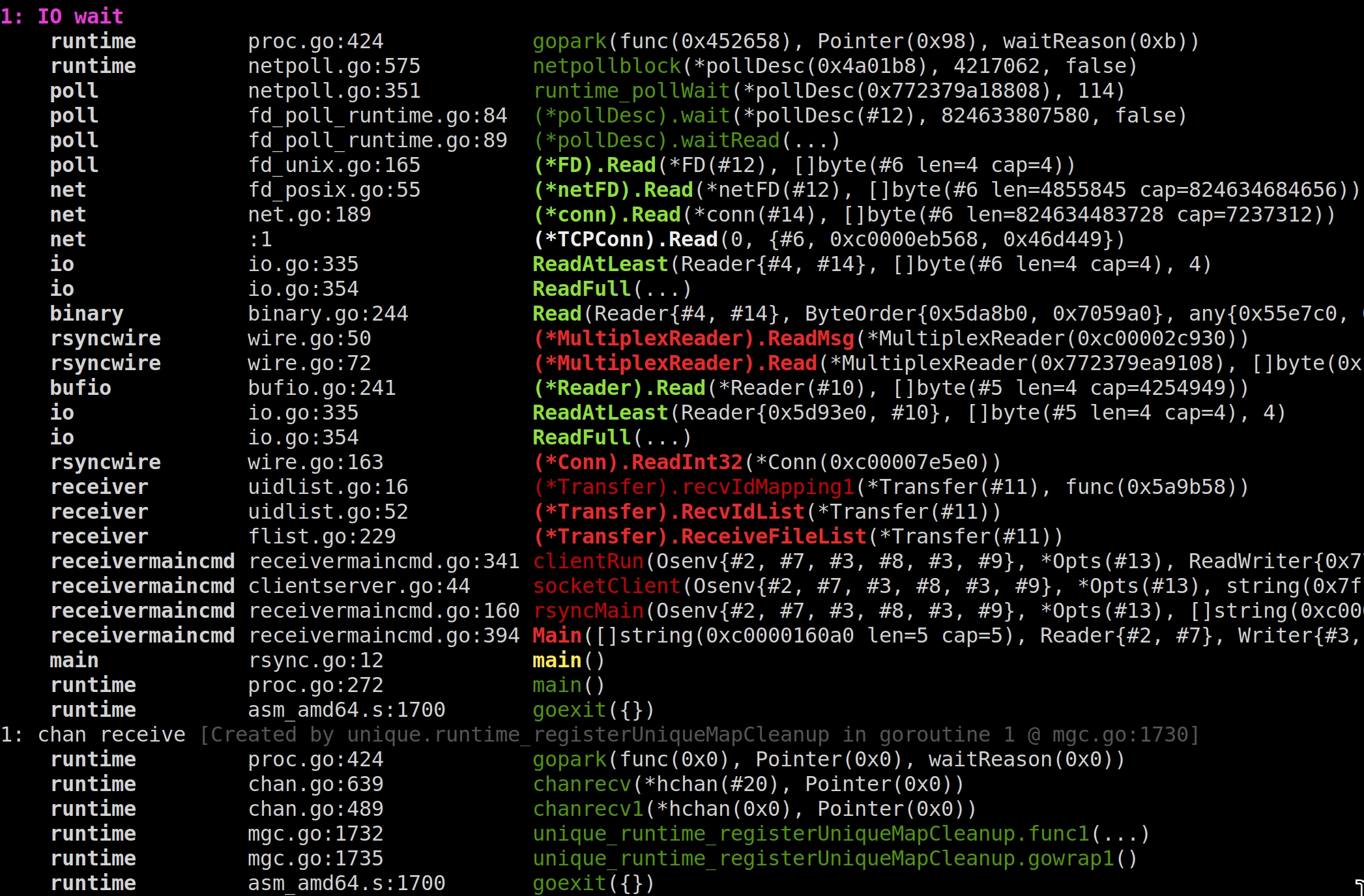
<p>We can use the <a href="https://github.com/maruel/panicparse">https://github.com/maruel/panicparse</a> program to present this
stack trace in a more colorful and much shorter version:</p>


<a href="https://michael.stapelberg.ch/posts/2025-02-27-debug-hanging-go-programs/2025-02-08-panicparse.jpg"><img
  srcset="https://michael.stapelberg.ch/posts/2025-02-27-debug-hanging-go-programs/2025-02-08-panicparse_hu_c04249176648ab38.jpg 2x,https://michael.stapelberg.ch/posts/2025-02-27-debug-hanging-go-programs/2025-02-08-panicparse_hu_8da191a897747329.jpg 3x"
  src="https://michael.stapelberg.ch/posts/2025-02-27-debug-hanging-go-programs/2025-02-08-panicparse_hu_e61da31f617a2260.jpg"
  
  width="600"
  height="394"
  style="

border: 1px solid #000;

"
  
  loading="lazy"></a>


<p>The functions helpfully highlighted in red are where the problem lies: My rsync
receiver implementation was incorrectly expecting the server to send a uid/gid
list, despite the PreserveUid and PreserveGid options not being enabled. <a href="https://github.com/gokrazy/rsync/commit/6c89d4dda3be055f19684c0ed56d623da458194e">Commit
<code>6c89d4d</code></a>
fixes the issue.</p>
<h2 id="attach-dlv">Tip 2: Attach the delve debugger to the process</h2>
<p>If dumping the stack trace in the moment is not sufficient to diagnose the
problem, you can go one step further and reach for an interactive debugger.</p>
<p>The most well-known Linux debugger is probably GDB, but when working with Go, I
recommend using <a href="https://github.com/go-delve/delve">the delve debugger</a> instead
as it typically works better. Install delve if you haven’t already:</p>
<pre tabindex="0"><code>% go install github.com/go-delve/delve/cmd/dlv@latest
</code></pre><p>In this article, I am using delve v1.24.0.</p>
<aside class="admonition note">
  <div class="note-container">
    <div class="note-icon" style="width: 20px; height: 20px">
      <svg id="exclamation-icon" width="100%" height="100%" viewBox="0 0 24 24" version="1.1" xmlns="http://www.w3.org/2000/svg" xmlns:xlink="http://www.w3.org/1999/xlink" xml:space="preserve" style="fill-rule:evenodd;clip-rule:evenodd;stroke-linejoin:round;stroke-miterlimit:1.41421;">
    <path d="M0,0L24,0L24,24L0,24L0,0Z" style="fill:none;"/>
    <g transform="matrix(1.2,0,0,1.2,-2.4,-2.4)">
        <path d="M12,2C6.48,2 2,6.48 2,12C2,17.52 6.48,22 12,22C17.52,22 22,17.52 22,12C22,6.48 17.52,2 12,2ZM13,17L11,17L11,15L13,15L13,17ZM13,13L11,13L11,7L13,7L13,13Z" style="fill-rule:nonzero;"/>
    </g>
</svg>

    </div>
    <div class="admonition-content"><p><strong>Note:</strong> If you want to explore local variables, you should rebuild your
program without optimizations and inlining (see the <a href="https://github.com/go-delve/delve/blob/master/Documentation/usage/dlv_exec.md"><code>dlv exec</code>
docs</a>):</p>
<pre tabindex="0"><code>% go install -gcflags=all=&#34;-N -l&#34; ./cmd/...
</code></pre></div>
  </div>
</aside>

<p>While you can run a new child process in a debugger (use <code>dlv exec</code>) without any
special permissions, attaching existing processes in a debugger is <a href="https://www.kernel.org/doc/Documentation/security/Yama.txt">disabled by
default in Linux</a>
for security reasons. We can allow this feature (remember to turn it off later!)
using:</p>
<pre tabindex="0"><code>% sudo sysctl -w kernel.yama.ptrace_scope=0
kernel.yama.ptrace_scope = 0
</code></pre><p>…and then we can just <code>dlv attach</code> to the hanging <code>gokr-rsync</code> process:</p>
<pre tabindex="0"><code>% dlv attach $(pidof gokr-rsync)
Type &#39;help&#39; for list of commands.
(dlv)
</code></pre><p>Great. But if we just print a stack trace, we only see functions from the
<code>runtime</code> package:</p>
<pre tabindex="0"><code>(dlv) bt
0  0x000000000047bb83 in runtime.futex
   at /home/michael/sdk/go1.23.6/src/runtime/sys_linux_amd64.s:558
1  0x00000000004374d0 in runtime.futexsleep
   at /home/michael/sdk/go1.23.6/src/runtime/os_linux.go:69
2  0x000000000040d89d in runtime.notesleep
   at /home/michael/sdk/go1.23.6/src/runtime/lock_futex.go:170
3  0x000000000044123e in runtime.mPark
   at /home/michael/sdk/go1.23.6/src/runtime/proc.go:1866
4  0x000000000044290d in runtime.stopm
   at /home/michael/sdk/go1.23.6/src/runtime/proc.go:2886
5  0x00000000004433d0 in runtime.findRunnable
   at /home/michael/sdk/go1.23.6/src/runtime/proc.go:3623
6  0x0000000000444e1d in runtime.schedule
   at /home/michael/sdk/go1.23.6/src/runtime/proc.go:3996
7  0x00000000004451cb in runtime.park_m
   at /home/michael/sdk/go1.23.6/src/runtime/proc.go:4103
8  0x0000000000477eee in runtime.mcall
   at /home/michael/sdk/go1.23.6/src/runtime/asm_amd64.s:459
</code></pre><p>The reason is that no goroutine is running (the program is waiting indefinitely
to receive data from the server), so we see one of the OS threads waiting in the
Go scheduler.</p>
<p>We first need to switch to the goroutine we are interested in (<code>grs</code> prints all
goroutines), and then the stack trace looks like what we expect:</p>
<pre tabindex="0"><code>(dlv) gr 1
Switched from 0 to 1 (thread 414327)
(dlv) bt
 0  0x0000000000474ebc in runtime.gopark
    at /home/michael/sdk/go1.23.6/src/runtime/proc.go:425
 1  0x000000000043819e in runtime.netpollblock
    at /home/michael/sdk/go1.23.6/src/runtime/netpoll.go:575
 2  0x000000000047435c in internal/poll.runtime_pollWait
    at /home/michael/sdk/go1.23.6/src/runtime/netpoll.go:351
 3  0x00000000004ed15a in internal/poll.(*pollDesc).wait
    at /home/michael/sdk/go1.23.6/src/internal/poll/fd_poll_runtime.go:84
 4  0x00000000004ed1f1 in internal/poll.(*pollDesc).waitRead
    at /home/michael/sdk/go1.23.6/src/internal/poll/fd_poll_runtime.go:89
 5  0x00000000004ee351 in internal/poll.(*FD).Read
    at /home/michael/sdk/go1.23.6/src/internal/poll/fd_unix.go:165
 6  0x0000000000569bb3 in net.(*netFD).Read
    at /home/michael/sdk/go1.23.6/src/net/fd_posix.go:55
 7  0x000000000057a025 in net.(*conn).Read
    at /home/michael/sdk/go1.23.6/src/net/net.go:189
 8  0x000000000058fcc5 in net.(*TCPConn).Read
    at &lt;autogenerated&gt;:1
 9  0x00000000004b72e8 in io.ReadAtLeast
    at /home/michael/sdk/go1.23.6/src/io/io.go:335
10  0x00000000004b74d3 in io.ReadFull
    at /home/michael/sdk/go1.23.6/src/io/io.go:354
11  0x0000000000598d5f in encoding/binary.Read
    at /home/michael/sdk/go1.23.6/src/encoding/binary/binary.go:244
12  0x00000000005a0b7a in github.com/gokrazy/rsync/internal/rsyncwire.(*MultiplexReader).ReadMsg
    at /home/michael/kr/rsync/internal/rsyncwire/wire.go:50
13  0x00000000005a0f17 in github.com/gokrazy/rsync/internal/rsyncwire.(*MultiplexReader).Read
    at /home/michael/kr/rsync/internal/rsyncwire/wire.go:72
14  0x0000000000528de8 in bufio.(*Reader).Read
    at /home/michael/sdk/go1.23.6/src/bufio/bufio.go:241
15  0x00000000004b72e8 in io.ReadAtLeast
    at /home/michael/sdk/go1.23.6/src/io/io.go:335
16  0x00000000004b74d3 in io.ReadFull
    at /home/michael/sdk/go1.23.6/src/io/io.go:354
17  0x00000000005a19ef in github.com/gokrazy/rsync/internal/rsyncwire.(*Conn).ReadInt32
    at /home/michael/kr/rsync/internal/rsyncwire/wire.go:163
18  0x00000000005b77d2 in github.com/gokrazy/rsync/internal/receiver.(*Transfer).recvIdMapping1
    at /home/michael/kr/rsync/internal/receiver/uidlist.go:16
19  0x00000000005b7ea8 in github.com/gokrazy/rsync/internal/receiver.(*Transfer).RecvIdList
    at /home/michael/kr/rsync/internal/receiver/uidlist.go:52
20  0x00000000005b18db in github.com/gokrazy/rsync/internal/receiver.(*Transfer).ReceiveFileList
    at /home/michael/kr/rsync/internal/receiver/flist.go:229
21  0x0000000000605390 in github.com/gokrazy/rsync/internal/receivermaincmd.clientRun
    at /home/michael/kr/rsync/internal/receivermaincmd/receivermaincmd.go:341
22  0x00000000005fe572 in github.com/gokrazy/rsync/internal/receivermaincmd.socketClient
    at /home/michael/kr/rsync/internal/receivermaincmd/clientserver.go:44
23  0x0000000000602f10 in github.com/gokrazy/rsync/internal/receivermaincmd.rsyncMain
    at /home/michael/kr/rsync/internal/receivermaincmd/receivermaincmd.go:160
24  0x0000000000605e7e in github.com/gokrazy/rsync/internal/receivermaincmd.Main
    at /home/michael/kr/rsync/internal/receivermaincmd/receivermaincmd.go:394
25  0x0000000000606653 in main.main
    at /home/michael/kr/rsync/cmd/gokr-rsync/rsync.go:12
26  0x000000000043fa47 in runtime.main
    at /home/michael/sdk/go1.23.6/src/runtime/proc.go:272
27  0x000000000047bd01 in runtime.goexit
    at /home/michael/sdk/go1.23.6/src/runtime/asm_amd64.s:1700
</code></pre><h2 id="save-core-dump">Tip 3: Save a core dump for later</h2>
<p>If you don’t have time to poke around in the debugger now, you can save a core
dump for later.</p>
<aside class="admonition note">
  <div class="note-container">
    <div class="note-icon" style="width: 20px; height: 20px">
      <svg id="exclamation-icon" width="100%" height="100%" viewBox="0 0 24 24" version="1.1" xmlns="http://www.w3.org/2000/svg" xmlns:xlink="http://www.w3.org/1999/xlink" xml:space="preserve" style="fill-rule:evenodd;clip-rule:evenodd;stroke-linejoin:round;stroke-miterlimit:1.41421;">
    <path d="M0,0L24,0L24,24L0,24L0,0Z" style="fill:none;"/>
    <g transform="matrix(1.2,0,0,1.2,-2.4,-2.4)">
        <path d="M12,2C6.48,2 2,6.48 2,12C2,17.52 6.48,22 12,22C17.52,22 22,17.52 22,12C22,6.48 17.52,2 12,2ZM13,17L11,17L11,15L13,15L13,17ZM13,13L11,13L11,7L13,7L13,13Z" style="fill-rule:nonzero;"/>
    </g>
</svg>

    </div>
    <div class="admonition-content"><strong>Tip:</strong> Check out my <a href="/posts/2024-10-22-debug-go-core-dumps-delve-export-bytes/">debugging Go core dumps with
delve</a> blog post from
2024 for more details! This section just explains how to collect core dumps.</div>
  </div>
</aside>

<p>In addition to printing the stack trace on <code>SIGQUIT</code>, we can make the Go runtime
crash the program, which in turn makes the Linux kernel write a core dump, by
running our program with the environment variable
<a href="https://pkg.go.dev/runtime"><code>GOTRACEBACK=crash</code></a>.</p>
<p>Modern Linux systems typically include <a href="https://manpages.debian.org/systemd-coredump.8"><code>systemd-coredump(8)</code></a>
 (but you might need to explicitly install it, for example on
Ubuntu) to collect core dumps (and remove old ones). You can use <a href="https://manpages.debian.org/coredumpctl.1"><code>coredumpctl(1)</code></a>
 to list and work with them. On macOS,
<a href="https://developer.apple.com/forums/thread/694233#695943022">collecting cores is more
involved</a>. I don’t
know about Windows.</p>
<p>In case your Linux system does not use <code>systemd-coredump</code>, you can use <code>ulimit -c unlimited</code> and set the kernel’s <code>kernel.core_pattern</code> sysctl setting. You can
find more details and options in the <a href="https://go.dev/wiki/CoreDumpDebugging">CoreDumpDebugging page of the Go
wiki</a>. For this article, we will stick to
<code>coredumpctl</code>:</p>
<pre tabindex="0"><code>% GOTRACEBACK=crash gokr-rsync -rtO --delete rsync://rsync.paas.rpki.ripe.net/repo/ /tmp/rpki-repo
[…]
^\SIGQUIT: quit
[…]
zsh: IOT instruction (core dumped)  GOTRACEBACK=crash gokr-rsync -rtO […]
</code></pre><p>The last line is what we want to see: it should say “core dumped”.</p>
<p>This core should now show up in <a href="https://manpages.debian.org/coredumpctl.1"><code>coredumpctl(1)</code></a>
:</p>
<pre tabindex="0"><code>% coredumpctl info
           PID: 414607 (gokr-rsync)
           UID: 1000 (michael)
           GID: 1000 (michael)
        Signal: 6 (ABRT)
     Timestamp: Sat 2025-02-08 10:18:27 CET (12s ago)
  Command Line: gokr-rsync -rtO --delete rsync://rsync.paas.rpki.ripe.net/repo/ /tmp/rpki-repo
    Executable: /bin/gokr-rsync
 Control Group: /user.slice/user-1000.slice/session-1.scope
          Unit: session-1.scope
         Slice: user-1000.slice
       Session: 1
     Owner UID: 1000 (michael)
       Boot ID: 6158dd3b52af4b8384c103a8a336fc02
    Machine ID: ecb5a44f1a5846ad871566e113bf8937
      Hostname: midna
       Storage: /var/lib/systemd/coredump/core.gokr-rsync.1000.6158dd3b52af4b8384c103a8a336fc02.414607.1739006307000000.zst (present)
  Size on Disk: 158.3K
       Message: Process 414607 (gokr-rsync) of user 1000 dumped core.
                
    Module [dso] without build-id.
    Module [dso]
    Stack trace of thread 1604447:
    #0  0x0000000000475a41 runtime.raise.abi0 (/bin/gokr-rsync + 0x75a41)
    #1  0x0000000000451d85 runtime.dieFromSignal (/bin/gokr-rsync + 0x51d85)
    #2  0x00000000004522e6 runtime.sigfwdgo (/bin/gokr-rsync + 0x522e6)
    #3  0x0000000000450c45 runtime.sigtrampgo (/bin/gokr-rsync + 0x50c45)
    #4  0x0000000000475d26 runtime.sigtramp.abi0 (/bin/gokr-rsync + 0x75d26)
    #5  0x0000000000475e20 n/a (/bin/gokr-rsync + 0x75e20)
    ELF object binary architecture: AMD x86-64
</code></pre><p>If you see only hexadecimal addresses followed by <code>n/a (n/a + 0x0)</code>, that means
<code>systemd-coredump</code> could not symbolize (= resolve addresses to function names)
your core dump. Here are a few possible reasons for missing symbolization:</p>
<ul>
<li>Linux 6.12 and 6.13 <a href="https://sourceware.org/bugzilla/show_bug.cgi?id=32713">produced core dumps that elfutils cannot
symbolize</a>. <code>systemd-coredump</code>
uses elfutils for symbolization, so avoid 6.12/6.13 in favor of using 6.14 or
newer.</li>
<li>With systemd v234-v256, <code>systemd-coredump</code> did not have permission to look
into programs living in the <code>/home</code> directory (fixed with <a href="https://github.com/systemd/systemd/commit/4ac1755be2d6c141fae7e57c42936e507c5b54e3">commit
<code>4ac1755</code></a>
in systemd v257+).
<ul>
<li>Similarly, <code>systemd-coredump</code> runs with
<a href="http://manpages.debian.org/systemd.exec"><code>PrivateTmp=yes</code></a>, meaning it
won’t be able to access programs you place in <code>/tmp</code>.</li>
</ul>
</li>
<li>Go builds with debug symbols by default, but maybe you are explicitly
stripping debug symbols in your build, by building with <code>-ldflags=-w</code>?</li>
</ul>
<p>We can now use <a href="https://manpages.debian.org/coredumpctl.1"><code>coredumpctl(1)</code></a>
 to launch delve for
this program + core dump:</p>
<pre tabindex="0"><code>% coredumpctl debug --debugger=dlv --debugger-arguments=core
[…]
Type &#39;help&#39; for list of commands.
(dlv) gr 1
Switched from 0 to 1 (thread 414607)
(dlv) bt
[…]
16  0x00000000004b74d3 in io.ReadFull
    at /home/michael/sdk/go1.23.6/src/io/io.go:354
17  0x00000000005a19ef in github.com/gokrazy/rsync/internal/rsyncwire.(*Conn).ReadInt32
    at /home/michael/kr/rsync/internal/rsyncwire/wire.go:163
18  0x00000000005b77d2 in github.com/gokrazy/rsync/internal/receiver.(*Transfer).recvIdMapping1
    at /home/michael/kr/rsync/internal/receiver/uidlist.go:16
19  0x00000000005b7ea8 in github.com/gokrazy/rsync/internal/receiver.(*Transfer).RecvIdList
    at /home/michael/kr/rsync/internal/receiver/uidlist.go:52
20  0x00000000005b18db in github.com/gokrazy/rsync/internal/receiver.(*Transfer).ReceiveFileList
    at /home/michael/kr/rsync/internal/receiver/flist.go:229
21  0x0000000000605390 in github.com/gokrazy/rsync/internal/receivermaincmd.clientRun
    at /home/michael/kr/rsync/internal/receivermaincmd/receivermaincmd.go:341
22  0x00000000005fe572 in github.com/gokrazy/rsync/internal/receivermaincmd.socketClient
    at /home/michael/kr/rsync/internal/receivermaincmd/clientserver.go:44
23  0x0000000000602f10 in github.com/gokrazy/rsync/internal/receivermaincmd.rsyncMain
    at /home/michael/kr/rsync/internal/receivermaincmd/receivermaincmd.go:160
24  0x0000000000605e7e in github.com/gokrazy/rsync/internal/receivermaincmd.Main
    at /home/michael/kr/rsync/internal/receivermaincmd/receivermaincmd.go:394
25  0x0000000000606653 in main.main
    at /home/michael/kr/rsync/cmd/gokr-rsync/rsync.go:12
26  0x000000000043fa47 in runtime.main
    at /home/michael/sdk/go1.23.6/src/runtime/proc.go:272
27  0x000000000047bd01 in runtime.goexit
    at /home/michael/sdk/go1.23.6/src/runtime/asm_amd64.s:1700
</code></pre><h2 id="conclusion">Conclusion</h2>
<p>In my experience, in the medium to long term, it always pays off to set up your
environment such that you can debug your programs conveniently. I strongly
encourage every programmer (and even users!) to invest time into your
development and debugging setup.</p>
<p>Luckily, Go comes with stack printing functionality by default (just press
<code>Ctrl+\</code>) and we can easily get a core dump out of our Go programs by running
them with <code>GOTRACEBACK=crash</code> — provided the system is set up to collect core
dumps.</p>
<p>Together with the delve debugger, this gives us all we need to effectively and
efficiently diagnose problems in Go programs.</p>
]]></content>
  </entry>
  <entry>
    <title type="html"><![CDATA[Debug Go core dumps with delve: export byte slices]]></title>
    <link href="https://michael.stapelberg.ch/posts/2024-10-22-debug-go-core-dumps-delve-export-bytes/"/>
    <id>https://michael.stapelberg.ch/posts/2024-10-22-debug-go-core-dumps-delve-export-bytes/</id>
    <published>2024-10-22T17:22:23+02:00</published>
    <content type="html"><![CDATA[<p>Not all bugs can easily be reproduced — sometimes, all you have is a core dump
from a crashing program, but no idea about the triggering conditions of the bug
yet.</p>
<p>When using Go, we can use <a href="https://github.com/go-delve/delve">the delve
debugger</a> for core dump debugging, but I had
trouble figuring out how to save byte slice contents (for example: the incoming
request causing the crash) from memory into a file for further analysis, so this
article walks you through how to do it.</p>
<h2 id="simple-example">Simple Example</h2>
<p>Let’s imagine the following scenario: You are working on a performance
optimization in <a href="https://pkg.go.dev/google.golang.org/protobuf">Go Protobuf</a> and
have accidentally badly broken the <a href="https://pkg.go.dev/google.golang.org/protobuf/proto#Marshal"><code>proto.Marshal</code>
function</a>. The
function is now returning an error, so let’s run one of the failing tests with
delve:</p>
<pre tabindex="0"><code>~/protobuf/proto master % dlv test
(dlv) b ExampleMarshal
(dlv) c
&gt; [Breakpoint 1] google.golang.org/protobuf/proto_test.ExampleMarshal() ./encode_test.go:293 (hits goroutine(1):1 total:1) (PC: 0x9d6c96)
(dlv) next 4
&gt; google.golang.org/protobuf/proto_test.ExampleMarshal() ./encode_test.go:297 (PC: 0xb54495)
   292: // [google.golang.org/protobuf/types/known/durationpb.New].
   293: func ExampleMarshal() {
   294: b, err := proto.Marshal(&amp;durationpb.Duration{
   295: Nanos: 125,
   296: })
=&gt; 297: if err != nil {
   298: panic(err)
   299: }
   300:
   301: fmt.Printf(&#34;125ns encoded into %d bytes of Protobuf wire format:\n% x\n&#34;, len(b), b)
   302:
</code></pre><p>Go Protobuf happens to return the already encoded bytes even when returning an
error, so we can inspect the <code>b</code> byte slice to see how far the encoding got
before the error happened:</p>
<pre tabindex="0"><code>(dlv) print b
[]uint8 len: 2, cap: 2, [16,125]
</code></pre><p>In this case, we can see that the entire (trivial) message was encoded, so our
error must happen at a later stage — this allows us to rule out a large chunk of
code in our search for the bug.</p>
<p>But what would we do if a longer part of the message was displayed and we wanted
to load it into a different tool for further analysis, e.g. the excellent
<a href="https://github.com/protocolbuffers/protoscope">protoscope</a>?</p>
<p>The low-tech approach is to print the contents and copy&amp;paste from the delve
output into an editor or similar. This stops working as soon as your data
contains non-printable characters.</p>
<p>We have multiple options to export the byte slice to a file:</p>
<ol>
<li>
<p>We could add <code>os.WriteFile(&quot;/tmp/b.raw&quot;, b, 0644)</code> to the source code and
re-run the test. This is definitely the simplest option, as it works with or
without a debugger.</p>
</li>
<li>
<p>As long as delve is connected to a running program, we can use delve’s call
command to just execute the same code without having to add it to our source:</p>
<pre tabindex="0"><code>(dlv) call os.WriteFile(&#34;/tmp/b.raw&#34;, b, 0644)
(dlv)
</code></pre></li>
</ol>
<p>Notably, both options only work when you can debug interactively. For the first
option, you need to be able to change the source. The second option requires
that delve is attached to a running process that you can afford to pause and
interactively control.</p>
<p>These are trivial requirements when running a unit tests on your local machine,
but get much harder when debugging an RPC service that crashes with specific
requests, as you need to only run your changed debugging code for the
troublesome requests, skipping the unproblematic requests that should still be
handled normally.</p>
<h2 id="core-dump-debugging-with-go">Core dump debugging with Go</h2>
<p>So let’s switch example: we are no longer working on Go Protobuf. Instead, we
now need to debug an RPC service where certain requests crash the service. We’ll
use core dump debugging!</p>


<a href="https://michael.stapelberg.ch/posts/2024-10-22-debug-go-core-dumps-delve-export-bytes/core-memory-featured.jpg"><img
  srcset="https://michael.stapelberg.ch/posts/2024-10-22-debug-go-core-dumps-delve-export-bytes/core-memory-featured_hu_a8173ece4c3f11e6.jpg 2x,https://michael.stapelberg.ch/posts/2024-10-22-debug-go-core-dumps-delve-export-bytes/core-memory-featured_hu_beea9b0751b668d7.jpg 3x"
  src="https://michael.stapelberg.ch/posts/2024-10-22-debug-go-core-dumps-delve-export-bytes/core-memory-featured_hu_604c37f3566e3ffa.jpg"
  alt="Core memory" title="Core memory"
  width="600"
  height="516"
  style="

border: 1px solid #000;

"
  
  loading="lazy"></a>


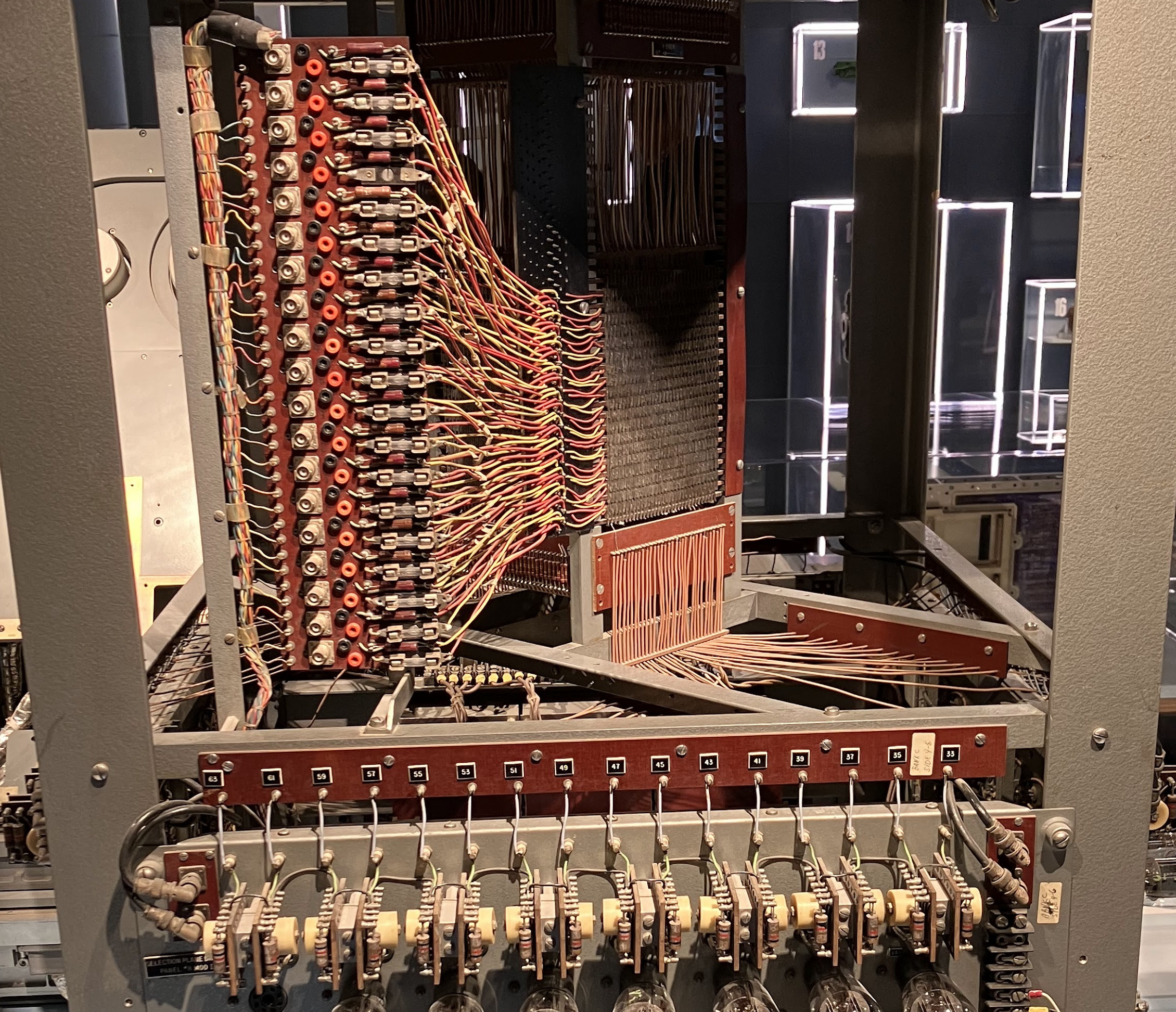
<p>In case you’re wondering: The name “<a href="https://en.wikipedia.org/wiki/Core_dump">core
dump</a>” comes from <a href="https://en.wikipedia.org/wiki/Magnetic-core_memory">magnetic-core
memory</a>. These days we
should probably say “memory dump” instead. The picture above shows an exhibit
from the <a href="https://mitmuseum.mit.edu/">MIT Museum</a> (<em>Core Memory Unit, Bank C
(from Project Whirlwind, 1953-1959))</em>, a core memory unit with 4 KB of capacity.</p>
<p>To make Go write a core dump when panicing, run your program with the
environment variable <code>GOTRACEBACK=crash</code> set (all possible values are documented
<a href="https://pkg.go.dev/runtime">in the <code>runtime</code> package</a>).</p>
<p>You also need to ensure your system is set up to collect core dumps, as they are
typically discarded by default:</p>
<ul>
<li>On Linux, the easiest way is to install <a href="https://manpages.debian.org/systemd-coredump.8"><code>systemd-coredump(8)</code></a>
, after which core dumps will automatically be collected. You
can use <a href="https://manpages.debian.org/coredumpctl.1"><code>coredumpctl(1)</code></a>
 to list and work with them.</li>
<li>On macOS, you can enable core dump collection, but <a href="https://github.com/go-delve/delve/issues/2026">delve cannot open macOS
core dumps</a>. Luckily, macOS is
rarely used for production servers.</li>
<li>I don’t know about Windows and other systems.</li>
</ul>
<p>You can find more details and options in the <a href="https://go.dev/wiki/CoreDumpDebugging">CoreDumpDebugging page of the Go
wiki</a>. For this article, we will stick to
the <code>coredumpctl</code> route:</p>
<p>We’ll use the <a href="https://grpc.io/docs/languages/go/quickstart/">gRPC Go Quick start
example</a>, a greeter client/server
program, and add a <code>panic()</code> call to the server <code>SayHello</code> handler:</p>
<pre tabindex="0"><code>% cd greeter_server
% go build -gcflags=all=&#34;-N -l&#34;  # disable optimizations
% GOTRACEBACK=crash ./greeter_server
2024/10/19 21:48:01 server listening at [::]:50051
2024/10/19 21:48:03 Received: world
panic: oh no!

goroutine 5 gp=0xc000007c00 m=5 mp=0xc000100008 [running]:
panic({0x83ca60?, 0x9a3710?})
	/home/michael/sdk/go1.23.0/src/runtime/panic.go:804 +0x168 fp=0xc000169850 sp=0xc0001697a0 pc=0x46fe88
main.(*server).SayHello(0xcbb840?, {0x877200?, 0xc000094900?}, 0x4a6f25?)
	/home/michael/go/src/github.com/grpc/grpc-go/examples/helloworld/greeter_server/main.go:45 +0xbf fp=0xc0001698c0 sp=0xc000169850 pc=0x8037ff
[…]
signal: aborted (core dumped)
</code></pre><p>The last line is what we want to see: it should say “core dumped”.</p>
<p>We can now use <a href="https://manpages.debian.org/coredumpctl.1"><code>coredumpctl(1)</code></a>
 to launch delve for
this program + core dump:</p>
<pre tabindex="0"><code>% coredumpctl debug --debugger=dlv --debugger-arguments=core
           PID: 1729467 (greeter_server)
           UID: 1000 (michael)
           GID: 1000 (michael)
        Signal: 6 (ABRT)
     Timestamp: Sat 2024-10-19 21:50:12 CEST (1min 49s ago)
  Command Line: ./greeter_server
    Executable: /home/michael/go/src/github.com/grpc/grpc-go/examples/helloworld/greeter_server/greeter_server
 Control Group: /user.slice/user-1000.slice/session-1.scope
          Unit: session-1.scope
         Slice: user-1000.slice
       Session: 1
     Owner UID: 1000 (michael)
       Storage: /var/lib/systemd/coredump/core.greeter_server.1000.zst (present)
  Size on Disk: 204.7K
       Message: Process 1729467 (greeter_server) of user 1000 dumped core.
                
                Module /home/michael/go/src/github.com/grpc/grpc-go/examples/helloworld/greeter_server/greeter_server without build-id.
                Stack trace of thread 1729470:
                #0  0x0000000000479461 n/a (greeter_server + 0x79461)
[…]
                ELF object binary architecture: AMD x86-64

Type &#39;help&#39; for list of commands.
(dlv) bt
 0  0x0000000000479461 in runtime.raise
    at /home/michael/sdk/go1.23.0/src/runtime/sys_linux_amd64.s:154
 1  0x0000000000451a85 in runtime.dieFromSignal
    at /home/michael/sdk/go1.23.0/src/runtime/signal_unix.go:942
 2  0x00000000004520e6 in runtime.sigfwdgo
    at /home/michael/sdk/go1.23.0/src/runtime/signal_unix.go:1154
 3  0x0000000000450a85 in runtime.sigtrampgo
    at /home/michael/sdk/go1.23.0/src/runtime/signal_unix.go:432
 4  0x0000000000479461 in runtime.raise
    at /home/michael/sdk/go1.23.0/src/runtime/sys_linux_amd64.s:153
 5  0x0000000000451a85 in runtime.dieFromSignal
    at /home/michael/sdk/go1.23.0/src/runtime/signal_unix.go:942
 6  0x0000000000439551 in runtime.crash
    at /home/michael/sdk/go1.23.0/src/runtime/signal_unix.go:1031
 7  0x0000000000439551 in runtime.fatalpanic
    at /home/michael/sdk/go1.23.0/src/runtime/panic.go:1290
 8  0x000000000046fe88 in runtime.gopanic
    at /home/michael/sdk/go1.23.0/src/runtime/panic.go:804
 9  0x00000000008037ff in main.(*server).SayHello
    at ./main.go:45
10  0x00000000008033a6 in google.golang.org/grpc/examples/helloworld/helloworld._Greeter_SayHello_Handler
    at /home/michael/go/src/github.com/grpc/grpc-go/examples/helloworld/helloworld/helloworld_grpc.pb.go:115
11  0x00000000007edeeb in google.golang.org/grpc.(*Server).processUnaryRPC
    at /home/michael/go/src/github.com/grpc/grpc-go/server.go:1394
12  0x00000000007f2eab in google.golang.org/grpc.(*Server).handleStream
    at /home/michael/go/src/github.com/grpc/grpc-go/server.go:1805
13  0x00000000007ebbff in google.golang.org/grpc.(*Server).serveStreams.func2.1
    at /home/michael/go/src/github.com/grpc/grpc-go/server.go:1029
14  0x0000000000477c21 in runtime.goexit
    at /home/michael/sdk/go1.23.0/src/runtime/asm_amd64.s:1700
(dlv) 
</code></pre><p>Alright! Now let’s switch to frame 9 (our server’s <code>SayHello</code> handler) and
inspect the <code>Name</code> field of the incoming RPC request:</p>
<pre tabindex="0"><code>(dlv) frame 9
&gt; runtime.raise() /home/michael/sdk/go1.23.0/src/runtime/sys_linux_amd64.s:154 (PC: 0x482681)
Warning: debugging optimized function
Frame 9: ./main.go:45 (PC: aaabf8)
    40:	}
    41:	
    42:	// SayHello implements helloworld.GreeterServer
    43:	func (s *server) SayHello(_ context.Context, in *pb.HelloRequest) (*pb.HelloReply, error) {
    44:		log.Printf(&#34;Received: %v&#34;, in.GetName())
=&gt;  45:		panic(&#34;oh no!&#34;)
    46:		return &amp;pb.HelloReply{Message: &#34;Hello &#34; + in.GetName()}, nil
    47:	}
    48:	
    49:	func main() {
    50:		flag.Parse()
(dlv) p in
(&#34;*google.golang.org/grpc/examples/helloworld/helloworld.HelloRequest&#34;)(0xc000120100)
*google.golang.org/grpc/examples/helloworld/helloworld.HelloRequest {
[…]
	unknownFields: []uint8 len: 0, cap: 0, nil,
	Name: &#34;world&#34;,}
</code></pre><p>In this case, it’s easy to see that the <code>Name</code> field was set to <code>world</code> in the
incoming request, but let’s assume the request contained lots of binary data
that was not as easy to read or copy.</p>
<p>How do we write the byte slice contents to a file? In this scenario, we cannot
modify the source code and delve’s <code>call</code> command does not work on core dumps
(only when delve is attached to a running process):</p>
<pre tabindex="0"><code>(dlv) call os.WriteFile(&#34;/tmp/name.raw&#34;, in.Name, 0644)
&gt; runtime.raise() /home/michael/sdk/go1.23.0/src/runtime/sys_linux_amd64.s:154 (PC: 0x482681)
Warning: debugging optimized function
Command failed: can not continue execution of core process
</code></pre><p>Luckily, we can extend delve with a custom Starlark function to write byte slice
contents to a file.</p>
<h2 id="exporting-byte-slices-with-writebytestofile">Exporting byte slices with writebytestofile</h2>
<p>You need a version of dlv that contains <a href="https://github.com/go-delve/delve/commit/52405ba86bd9e14a2e643db391cbdebdcbdb3368">commit
52405ba</a>. Until
the commit is part of a released version, you can install the latest dlv
directly from git:</p>
<pre tabindex="0"><code>% go install github.com/go-delve/delve/cmd/dlv@master
</code></pre><p>Save the following Starlark code to a file, for example <code>~/dlv_writebytestofile.star</code>:</p>
<div class="highlight"><pre tabindex="0" style="background-color:#f0f0f0;-moz-tab-size:4;-o-tab-size:4;tab-size:4;"><code class="language-python" data-lang="python"><span style="display:flex;"><span><span style="color:#60a0b0;font-style:italic"># Syntax: writebytestofile &lt;byte slice var&gt; &lt;output file path&gt;</span>
</span></span><span style="display:flex;"><span><span style="color:#007020;font-weight:bold">def</span> <span style="color:#06287e">command_writebytestofile</span>(args):
</span></span><span style="display:flex;"><span>	var_name, filename <span style="color:#666">=</span> args<span style="color:#666">.</span>split(<span style="color:#4070a0">&#34; &#34;</span>)
</span></span><span style="display:flex;"><span>	s <span style="color:#666">=</span> <span style="color:#007020">eval</span>(<span style="color:#007020;font-weight:bold">None</span>, var_name)<span style="color:#666">.</span>Variable
</span></span><span style="display:flex;"><span>	mem <span style="color:#666">=</span> examine_memory(s<span style="color:#666">.</span>Base, s<span style="color:#666">.</span>Len)<span style="color:#666">.</span>Mem
</span></span><span style="display:flex;"><span>	write_file(filename, mem)
</span></span></code></pre></div><p>Then, in delve, load the Starlark code and run the function to export the byte
slice contents of <code>in.Name</code> to <code>/tmp/name.raw</code>:</p>
<pre tabindex="0"><code>% coredumpctl debug --debugger=dlv --debugger-arguments=core
(dlv) frame 9
(dlv) source ~/dlv_writebytestofile.star
(dlv) writebytestofile in.Name /tmp/name.raw
</code></pre><p>Let’s verify that we got the right contents:</p>
<pre tabindex="0"><code>% hexdump -C /tmp/name.raw
00000000  77 6f 72 6c 64                                    |world|
00000005
</code></pre><h2 id="core-dump-debugging-with-nethttp-servers">Core dump debugging with <code>net/http</code> servers</h2>
<p>When you want to apply the core dump debugging technique on a <code>net/http</code> server
(instead of a gRPC server, as above), you will notice that panics in your HTTP
handlers do not actually result in a core dump! This code in
<code>go/src/net/http/server.go</code> recovers panics and logs a stack trace:</p>
<div class="highlight"><pre tabindex="0" style="background-color:#f0f0f0;-moz-tab-size:4;-o-tab-size:4;tab-size:4;"><code class="language-go" data-lang="go"><span style="display:flex;"><span><span style="color:#007020;font-weight:bold">defer</span><span style="color:#bbb"> </span><span style="color:#007020;font-weight:bold">func</span>()<span style="color:#bbb"> </span>{<span style="color:#bbb">
</span></span></span><span style="display:flex;"><span><span style="color:#bbb">    </span><span style="color:#007020;font-weight:bold">if</span><span style="color:#bbb"> </span>err<span style="color:#bbb"> </span><span style="color:#666">:=</span><span style="color:#bbb"> </span><span style="color:#007020">recover</span>();<span style="color:#bbb"> </span>err<span style="color:#bbb"> </span><span style="color:#666">!=</span><span style="color:#bbb"> </span><span style="color:#007020;font-weight:bold">nil</span><span style="color:#bbb"> </span><span style="color:#666">&amp;&amp;</span><span style="color:#bbb"> </span>err<span style="color:#bbb"> </span><span style="color:#666">!=</span><span style="color:#bbb"> </span>ErrAbortHandler<span style="color:#bbb"> </span>{<span style="color:#bbb">
</span></span></span><span style="display:flex;"><span><span style="color:#bbb">        </span><span style="color:#007020;font-weight:bold">const</span><span style="color:#bbb"> </span>size<span style="color:#bbb"> </span>=<span style="color:#bbb"> </span><span style="color:#40a070">64</span><span style="color:#bbb"> </span><span style="color:#666">&lt;&lt;</span><span style="color:#bbb"> </span><span style="color:#40a070">10</span><span style="color:#bbb">
</span></span></span><span style="display:flex;"><span><span style="color:#bbb">        </span>buf<span style="color:#bbb"> </span><span style="color:#666">:=</span><span style="color:#bbb"> </span><span style="color:#007020">make</span>([]<span style="color:#902000">byte</span>,<span style="color:#bbb"> </span>size)<span style="color:#bbb">
</span></span></span><span style="display:flex;"><span><span style="color:#bbb">        </span>buf<span style="color:#bbb"> </span>=<span style="color:#bbb"> </span>buf[:runtime.<span style="color:#06287e">Stack</span>(buf,<span style="color:#bbb"> </span><span style="color:#007020;font-weight:bold">false</span>)]<span style="color:#bbb">
</span></span></span><span style="display:flex;"><span><span style="color:#bbb">        </span>c.server.<span style="color:#06287e">logf</span>(<span style="color:#4070a0">&#34;http: panic serving %v: %v\n%s&#34;</span>,<span style="color:#bbb"> </span>c.remoteAddr,<span style="color:#bbb"> </span>err,<span style="color:#bbb"> </span>buf)<span style="color:#bbb">
</span></span></span><span style="display:flex;"><span><span style="color:#bbb">    </span>}<span style="color:#bbb">
</span></span></span><span style="display:flex;"><span><span style="color:#bbb"></span>}()<span style="color:#bbb">
</span></span></span></code></pre></div><p>Or, in other words: the <code>GOTRACEBACK=crash</code> environment variable configures what
happens for unhandled signals, but this signal is handled with the <code>recover()</code>
call, so no core is dumped.</p>
<p>This default behavior of <code>net/http</code> servers <a href="https://github.com/golang/go/issues/25245">is now considered regrettable but
cannot be changed for
compatibility</a>. (We probably can add
a struct field to optionally not recover panics, though. I’ll update this
paragraph once there is a proposal.)</p>
<p>So, what options do we have in the meantime?</p>
<p>We could recover panics in our own code (before <code>net/http</code>’s panic handler is
called), but then how do we produce a core dump from our own handler?</p>
<p>A closer look reveals that the Go runtime’s <code>crash</code> function is defined in
<code>signal_unix.go</code> and <a href="https://cs.opensource.google/go/go/+/refs/tags/go1.23.2:src/runtime/signal_unix.go;l=938">sends signal <code>SIGABRT</code> with the <code>dieFromSignal</code>
function</a>
to the current thread:</p>
<div class="highlight"><pre tabindex="0" style="background-color:#f0f0f0;-moz-tab-size:4;-o-tab-size:4;tab-size:4;"><code class="language-go" data-lang="go"><span style="display:flex;"><span><span style="color:#007020">//go:nosplit</span><span style="color:#bbb">
</span></span></span><span style="display:flex;"><span><span style="color:#bbb"></span><span style="color:#007020;font-weight:bold">func</span><span style="color:#bbb"> </span><span style="color:#06287e">crash</span>()<span style="color:#bbb"> </span>{<span style="color:#bbb">
</span></span></span><span style="display:flex;"><span><span style="color:#bbb">        </span><span style="color:#06287e">dieFromSignal</span>(_SIGABRT)<span style="color:#bbb">
</span></span></span><span style="display:flex;"><span><span style="color:#bbb"></span>}<span style="color:#bbb">
</span></span></span></code></pre></div><p>The default action for <code>SIGABRT</code> is to “terminate the process and dump core”,
see <a href="https://manpages.debian.org/signal.7"><code>signal(7)</code></a>
.</p>
<p>We can follow the same strategy and send <code>SIGABRT</code> to our process:</p>
<div class="highlight"><pre tabindex="0" style="background-color:#f0f0f0;-moz-tab-size:4;-o-tab-size:4;tab-size:4;"><code class="language-go" data-lang="go"><span style="display:flex;"><span><span style="color:#007020;font-weight:bold">func</span><span style="color:#bbb"> </span><span style="color:#06287e">main</span>()<span style="color:#bbb"> </span>{<span style="color:#bbb">
</span></span></span><span style="display:flex;"><span><span style="color:#bbb">	</span>http.<span style="color:#06287e">HandleFunc</span>(<span style="color:#4070a0">&#34;/&#34;</span>,<span style="color:#bbb"> </span><span style="color:#007020;font-weight:bold">func</span>(w<span style="color:#bbb"> </span>http.ResponseWriter,<span style="color:#bbb"> </span>r<span style="color:#bbb"> </span><span style="color:#666">*</span>http.Request)<span style="color:#bbb"> </span>{<span style="color:#bbb">
</span></span></span><span style="display:flex;"><span><span style="color:#bbb">		</span><span style="color:#007020;font-weight:bold">defer</span><span style="color:#bbb"> </span><span style="color:#007020;font-weight:bold">func</span>()<span style="color:#bbb"> </span>{<span style="color:#bbb">
</span></span></span><span style="display:flex;"><span><span style="color:#bbb">			</span><span style="color:#007020;font-weight:bold">if</span><span style="color:#bbb"> </span>err<span style="color:#bbb"> </span><span style="color:#666">:=</span><span style="color:#bbb"> </span><span style="color:#007020">recover</span>();<span style="color:#bbb"> </span>err<span style="color:#bbb"> </span><span style="color:#666">!=</span><span style="color:#bbb"> </span><span style="color:#007020;font-weight:bold">nil</span><span style="color:#bbb"> </span>{<span style="color:#bbb">
</span></span></span><span style="display:flex;"><span><span style="color:#bbb">				</span>proc,<span style="color:#bbb"> </span>err<span style="color:#bbb"> </span><span style="color:#666">:=</span><span style="color:#bbb"> </span>os.<span style="color:#06287e">FindProcess</span>(syscall.<span style="color:#06287e">Getpid</span>())<span style="color:#bbb">
</span></span></span><span style="display:flex;"><span><span style="color:#bbb">				</span><span style="color:#007020;font-weight:bold">if</span><span style="color:#bbb"> </span>err<span style="color:#bbb"> </span><span style="color:#666">!=</span><span style="color:#bbb"> </span><span style="color:#007020;font-weight:bold">nil</span><span style="color:#bbb"> </span>{<span style="color:#bbb">
</span></span></span><span style="display:flex;"><span><span style="color:#bbb">					</span><span style="color:#007020">panic</span>(fmt.<span style="color:#06287e">Sprintf</span>(<span style="color:#4070a0">&#34;could not find own process (pid %d): %v&#34;</span>,<span style="color:#bbb"> </span>syscall.<span style="color:#06287e">Getpid</span>(),<span style="color:#bbb"> </span>err))<span style="color:#bbb">
</span></span></span><span style="display:flex;"><span><span style="color:#bbb">				</span>}<span style="color:#bbb">
</span></span></span><span style="display:flex;"><span><span style="color:#bbb">				</span>proc.<span style="color:#06287e">Signal</span>(syscall.SIGABRT)<span style="color:#bbb">
</span></span></span><span style="display:flex;"><span><span style="color:#bbb">				</span><span style="color:#60a0b0;font-style:italic">// Ensure the stack triggering the core dump sticks around</span><span style="color:#bbb">
</span></span></span><span style="display:flex;"><span><span style="color:#bbb">				</span>proc.<span style="color:#06287e">Wait</span>()<span style="color:#bbb">
</span></span></span><span style="display:flex;"><span><span style="color:#bbb">			</span>}<span style="color:#bbb">
</span></span></span><span style="display:flex;"><span><span style="color:#bbb">		</span>}()<span style="color:#bbb">
</span></span></span><span style="display:flex;"><span><span style="color:#bbb">		</span><span style="color:#60a0b0;font-style:italic">// …buggy handler code goes here; for illustration we panic</span><span style="color:#bbb">
</span></span></span><span style="display:flex;"><span><span style="color:#bbb">		</span><span style="color:#007020">panic</span>(<span style="color:#4070a0">&#34;this should result in a core dump&#34;</span>)<span style="color:#bbb">
</span></span></span><span style="display:flex;"><span><span style="color:#bbb">	</span>})<span style="color:#bbb">
</span></span></span><span style="display:flex;"><span><span style="color:#bbb">	</span>log.<span style="color:#06287e">Fatal</span>(http.<span style="color:#06287e">ListenAndServe</span>(<span style="color:#4070a0">&#34;:8080&#34;</span>,<span style="color:#bbb"> </span><span style="color:#007020;font-weight:bold">nil</span>))<span style="color:#bbb">
</span></span></span><span style="display:flex;"><span><span style="color:#bbb"></span>}<span style="color:#bbb">
</span></span></span></code></pre></div><p>There is one caveat: If you have any non-Go threads running in your program,
e.g. by using cgo, they might pick up the signal, so ensure they do not install
a <code>SIGABRT</code> handler (see also: <a href="https://pkg.go.dev/os/signal#hdr-Go_programs_that_use_cgo_or_SWIG">cgo-related documentation in
<code>os/signal</code></a>).</p>
<p>If this is a concern, you can make the above code more platform-specific and use
the <a href="https://manpages.debian.org/tgkill.2"><code>tgkill(2)</code></a>
 syscall to direct the signal to the
current thread, as <a href="https://cs.opensource.google/go/go/+/refs/tags/go1.23.2:src/runtime/sys_linux_amd64.s;l=143">the Go runtime
does</a>.</p>
<h2 id="conclusion">Conclusion</h2>
<p>Core dump debugging can be a very useful technique to quickly make progress on
otherwise hard-to-debug problems. In small environments (single to few Linux
servers), core dumps are easy enough to turn on and work with, but in larger
environments you might need to invest into central core dump collection.</p>
<p>I hope the technique shown above comes in handy when you need to work with core
dumps.</p>
]]></content>
  </entry>
  <entry>
    <title type="html"><![CDATA[Minimal Linux Bootloader debugging story 🐞]]></title>
    <link href="https://michael.stapelberg.ch/posts/2024-02-11-minimal-linux-bootloader-debugging-story/"/>
    <id>https://michael.stapelberg.ch/posts/2024-02-11-minimal-linux-bootloader-debugging-story/</id>
    <published>2024-02-11T10:28:00+01:00</published>
    <content type="html"><![CDATA[<p>I maintain two builds of the Linux kernel, a <code>linux/arm64</code> build for <a href="https://gokrazy.org">gokrazy,
my Go appliance platform</a>, which started out on the
Raspberry Pi, and then a <code>linux/amd64</code> one for <a href="https://router7.org/">router7</a>,
which runs on PCs.</p>
<p>The update process for both of these builds is entirely automated, meaning new
Linux kernel releases are automatically tested and merged, but recently the
continuous integration testing <a href="https://github.com/rtr7/kernel/pull/434">failed to automatically merge Linux
6․7</a> — this article is about tracking
down the root cause of that failure.</p>
<h2 id="background-info-on-the-bootloader">Background info on the bootloader</h2>
<p>gokrazy started out targeting only the Raspberry Pi, where you configure the
bootloader with a plain text file on a FAT partition, so we did not need to
include our own UEFI/MBR bootloader.</p>
<p>When I ported gokrazy to work on PCs in BIOS mode, I decided against complicated
solutions like GRUB — I really wasn’t looking to maintain a GRUB package. Just
keeping GRUB installations working on my machines is enough work. The fact that
GRUB consists of many different files (modules) that can go out of sync really
does not appeal to me.</p>
<aside class="admonition note">
  <div class="note-container">
    <div class="note-icon" style="width: 20px; height: 20px">
      <svg id="exclamation-icon" width="100%" height="100%" viewBox="0 0 24 24" version="1.1" xmlns="http://www.w3.org/2000/svg" xmlns:xlink="http://www.w3.org/1999/xlink" xml:space="preserve" style="fill-rule:evenodd;clip-rule:evenodd;stroke-linejoin:round;stroke-miterlimit:1.41421;">
    <path d="M0,0L24,0L24,24L0,24L0,0Z" style="fill:none;"/>
    <g transform="matrix(1.2,0,0,1.2,-2.4,-2.4)">
        <path d="M12,2C6.48,2 2,6.48 2,12C2,17.52 6.48,22 12,22C17.52,22 22,17.52 22,12C22,6.48 17.52,2 12,2ZM13,17L11,17L11,15L13,15L13,17ZM13,13L11,13L11,7L13,7L13,13Z" style="fill-rule:nonzero;"/>
    </g>
</svg>

    </div>
    <div class="admonition-content">For UEFI, there is <a href="https://en.wikipedia.org/wiki/Systemd-boot">systemd-boot</a>,
which comes as a single-file UEFI program, easy to include. That’s how gokrazy
supports UEFI boot. Unfortunately, the PC Engines apu2c4 does not support UEFI,
so I also needed an MBR solution.</div>
  </div>
</aside>

<p>Instead, I went with Sebastian Plotz’s <a href="https://sebastian-plotz.blogspot.com/2012/07/1.html">Minimal Linux
Bootloader</a> because it fits
entirely into the <a href="https://en.wikipedia.org/wiki/Master_boot_record">Master Boot Record
(MBR)</a> and does not require
any files. In bootloader lingo, this is a stage1-only bootloader. You don’t even
need a C compiler to compile its (Assembly) code. It seemed simple enough to
integrate: just write the bootloader code into the first sector of the gokrazy
disk image; done. The bootloader had its last release in 2012, so no need for
updates or maintenance.</p>
<p>You can’t really implement booting a kernel <strong>and</strong> parsing text configuration
files in <a href="https://en.wikipedia.org/wiki/Master_boot_record#Sector_layout">446
bytes</a> of 16-bit
8086 assembly instructions, so to tell the bootloader where on disk to load the
kernel code and kernel command line from, gokrazy writes the disk offset
(<a href="https://en.wikipedia.org/wiki/Logical_block_addressing">LBA</a>) of <code>vmlinuz</code> and
<code>cmdline.txt</code> to the last bytes of the bootloader code. Because gokrazy
generates the FAT partition, we know there is never any fragmentation, so the
bootloader does not need to understand the FAT file system.</p>
<h2 id="symptom">Symptom</h2>
<p>The symptom was that the <code>rtr7/kernel</code> <a href="https://github.com/rtr7/kernel/pull/434">pull request
#434</a> for updating to Linux 6.7 failed.</p>
<p>My continuous integration tests run in two environments: a physical embedded PC
from <a href="https://pcengines.ch/">PC Engines</a> (apu2c4) in my living room, and a
virtual QEMU PC. Only the QEMU test failed.</p>
<p>On the physical PC Engines apu2c4, the pull request actually passed the boot
test. It would be wrong to draw conclusions like “the issue only affects QEMU”
from this, though, as later attempts to power on the apu2c4 showed the device
boot-looping. I made a mental note that <em>something is different</em> about how the
problem affects the two environments, but both are affected, and decided to
address the failure in QEMU first, then think about the PC Engines failure some
more.</p>
<aside class="admonition note">
  <div class="note-container">
    <div class="note-icon" style="width: 20px; height: 20px">
      <svg id="exclamation-icon" width="100%" height="100%" viewBox="0 0 24 24" version="1.1" xmlns="http://www.w3.org/2000/svg" xmlns:xlink="http://www.w3.org/1999/xlink" xml:space="preserve" style="fill-rule:evenodd;clip-rule:evenodd;stroke-linejoin:round;stroke-miterlimit:1.41421;">
    <path d="M0,0L24,0L24,24L0,24L0,0Z" style="fill:none;"/>
    <g transform="matrix(1.2,0,0,1.2,-2.4,-2.4)">
        <path d="M12,2C6.48,2 2,6.48 2,12C2,17.52 6.48,22 12,22C17.52,22 22,17.52 22,12C22,6.48 17.52,2 12,2ZM13,17L11,17L11,15L13,15L13,17ZM13,13L11,13L11,7L13,7L13,13Z" style="fill-rule:nonzero;"/>
    </g>
</svg>

    </div>
    <div class="admonition-content">Later in the investigation I found out that this was because the
physical continuous integration setup didn’t <a href="https://github.com/gokrazy/gokrazy/issues/243">disable kexec
yet</a>, so it wasn’t actually
exercising BIOS boot via the Master Boot Record.</div>
  </div>
</aside>

<p>In QEMU, the output I see is:</p>
<pre tabindex="0"><code>SeaBIOS (version Arch Linux 1.16.3-1-1)

iPXE (http://ipxe.org) 00:03.0 C900 PCI2.10 PnP PMM+06FD3360+06F33360 C900

Booting from Hard Disk...
</code></pre><p>Notably, the kernel doesn’t even seem to start — no “Decompressing linux”
message is printed, the boot just hangs. I tried enabling debug output in
SeaBIOS and <a href="https://github.com/rtr7/router7/issues/83#issuecomment-1890354927">eventually succeeded, but only with an older QEMU
version</a>:</p>
<pre tabindex="0"><code>Booting from Hard Disk...
Booting from 0000:7c00
In resume (status=0)
In 32bit resume
Attempting a hard reboot
</code></pre><p>This doesn’t tell me anything unfortunately.</p>
<p>Okay, so something about introducing Linux 6.7 into my setup breaks MBR boot.</p>
<p>I figured using <a href="https://opensource.com/article/22/11/git-bisect">Git Bisection</a>
should identify the problematic change within a few iterations, so I cloned the
currently working Linux 6.6 source code, applied the router7 config and compiled
it.</p>
<p>To my surprise, even my self-built Linux 6.6 kernel would not boot! 😲</p>
<p>Why does the router7 build work when built inside the Docker container, but not
when built on my Linux installation? I decided to rebase the Docker container
from Debian 10 (buster, from 2019) to Debian 12 (bookworm, from 2023) and that
resulted in a non-booting kernel, too!</p>
<p>We have two triggers: building Linux 6.7 or building older Linux, but in newer
environments.</p>
<h2 id="meta-following-along">Meta: Following Along</h2>
<details>
<summary>(Contains spoilers) Instructions for following along</summary>
<p>First, check out the <code>rtr7/kernel</code> repository and undo <a href="#mitigation">the mitigation</a>:</p>
<pre tabindex="0"><code>% mkdir -p go/src/github.com/rtr7/
% cd go/src/github.com/rtr7/
% git clone --depth=1 https://github.com/rtr7/kernel
% cd kernel
% sed -i &#39;s,CONFIG_KERNEL_ZSTD,#CONFIG_KERNEL_ZSTD,g&#39; cmd/rtr7-build-kernel/config.addendum.txt
% go run ./cmd/rtr7-rebuild-kernel
# takes a few minutes to compile Linux
% ls -l vmlinuz
-rw-r--r-- 1 michael michael 15885312 2024-01-28 16:18 vmlinuz
</code></pre><p>Now, you can either create a new gokrazy instance, replace the kernel and
configure the gokrazy instance to use <code>rtr7/kernel</code>:</p>
<pre tabindex="0"><code>% gok -i mbr new
% gok -i mbr add .
% gok -i mbr edit
# Adjust to contain:
    &#34;KernelPackage&#34;: &#34;github.com/rtr7/kernel&#34;,
    &#34;FirmwarePackage&#34;: &#34;github.com/rtr7/kernel&#34;,
    &#34;EEPROMPackage&#34;: &#34;&#34;,
</code></pre><p>…or you skip these steps and extract <a href="gokrazy-mbr.tar.bz2">my already prepared
config</a> to <code>~/gokrazy/mbr</code>.</p>
<p>Then, build the gokrazy disk image and start it with QEMU:</p>
<pre tabindex="0"><code>% GOARCH=amd64 gok -i mbr overwrite \
  --full /tmp/gokr-boot.img \
  --target_storage_bytes=1258299392
% qemu-system-i386 \
  -nographic \
  -drive file=/tmp/gokr-boot.img,format=raw
</code></pre></details>
<h2 id="updowngrade-versions">Up/Downgrade Versions</h2>
<p>Unlike application programs, the Linux kernel doesn’t depend on shared libraries
at runtime, so the dependency footprint is a little smaller than usual. The most
significant dependencies are the components of the build environment, like the C
compiler or the linker.</p>
<p>So let’s look at the software versions of the known-working (Debian 10)
environment and the smallest change we can make to that (upgrading to Debian
11):</p>
<ul>
<li>Debian 10 (buster) contains gcc-8 (8.3.0-6) and binutils 2.31.1-16.</li>
<li>Debian 11 (bullseye) contains gcc-10 (10.2.1-6) and binutils 2.35.2-2.</li>
</ul>
<p>To figure out if the problem is triggered by GCC, binutils, or something else
entirely, I checked:</p>
<p>Debian 10 (buster) with its <code>gcc-8</code>, but with <code>binutils 2.35</code> from bullseye
still works. (Checked by updating <code>/etc/apt/sources.list</code>, then upgrading only
the <code>binutils</code> package.)</p>
<p>Debian 10 (buster), but with <code>gcc-10</code> and <code>binutils 2.35</code> results in a
non-booting kernel.</p>
<p>So it seems like upgrading from GCC 8 to GCC 10 triggers the issue.</p>
<p>Instead of working with a Docker container and Debian’s packages, you could also
use <a href="https://en.wikipedia.org/wiki/Nix_(package_manager)">Nix</a>. The instructions
aren’t easy, but I <a href="https://github.com/rtr7/router7/issues/83#issuecomment-1885612487">used
<code>nix-shell</code></a>
to quickly try out GCC 8 (works), GCC 9 (works) and GCC 10 (kernel doesn’t boot)
on my machine.</p>
<h2 id="new-hypothesis">New Hypothesis</h2>
<p>To recap, we have two triggers: building Linux 6.7 or building older Linux, but
with GCC 10.</p>
<p>Two theories seemed most plausible to me at this point: Either a change in GCC
10 (possibly enabled by another change in Linux 6.7) is the problem, or the size
of the kernel is the problem.</p>
<p>To verify the file size hypothesis, I padded a known-working <code>vmlinuz</code> file to
the size of a known-broken <code>vmlinuz</code>:</p>
<pre tabindex="0"><code>% ls -l vmlinuz
% dd if=/dev/zero bs=108352 count=1 &gt;&gt; vmlinuz
</code></pre><p>But, even though it had the same file size as the known-broken kernel, the
padded kernel booted!</p>
<p>So I ruled out kernel size as a problem and started researching significant
changes in GCC 10.</p>
<aside class="admonition note">
  <div class="note-container">
    <div class="note-icon" style="width: 20px; height: 20px">
      <svg id="exclamation-icon" width="100%" height="100%" viewBox="0 0 24 24" version="1.1" xmlns="http://www.w3.org/2000/svg" xmlns:xlink="http://www.w3.org/1999/xlink" xml:space="preserve" style="fill-rule:evenodd;clip-rule:evenodd;stroke-linejoin:round;stroke-miterlimit:1.41421;">
    <path d="M0,0L24,0L24,24L0,24L0,0Z" style="fill:none;"/>
    <g transform="matrix(1.2,0,0,1.2,-2.4,-2.4)">
        <path d="M12,2C6.48,2 2,6.48 2,12C2,17.52 6.48,22 12,22C17.52,22 22,17.52 22,12C22,6.48 17.52,2 12,2ZM13,17L11,17L11,15L13,15L13,17ZM13,13L11,13L11,7L13,7L13,13Z" style="fill-rule:nonzero;"/>
    </g>
</svg>

    </div>
    <div class="admonition-content">This is an incorrect conclusion! The mistake I made here was that I padded the
kernel on the file level, but the boot loader ignores the file system entirely
and takes the size from the <strong>kernel header</strong>, which I did not update.</div>
  </div>
</aside>

<p>I read that GCC 10 <a href="https://lore.kernel.org/lkml/20200422192113.GG26846@zn.tnic/t/">changed behavior with regards to stack
protection</a>.</p>
<p>Indeed, building the kernel with Debian 11 (bullseye), but with
<code>CONFIG_STACKPROTECTOR=n</code> makes it boot. So, I suspected that our bootloader
does not set up the stack correctly, or similar.</p>
<p>I sent an email to Sebastian Plotz, the author of the Minimal Linux Bootloader,
to ask if he knew about any issues with his bootloader, or if stack protection
seems like a likely issue with his bootloader to him.</p>
<p>To my surprise (it has been over 10 years since he published the bootloader!) he
actually replied: He hadn’t received any problem reports regarding his
bootloader, but didn’t really understand how stack protection would be related.</p>
<h2 id="debugging-with-qemu">Debugging with QEMU</h2>
<p>At this point, we have isolated at least one trigger for the problem, and
exhausted the easy techniques of upgrading/downgrading surrounding software
versions and asking upstream.</p>
<p>It’s time for a <strong>Tooling Level Up</strong>! Without a debugger you can only poke into
the dark, which takes time and doesn’t result in thorough
explanations. Particularly in this case, I think it is very likely that any
source modifications could have introduced subtle issues. So let’s reach for a
debugger!</p>
<p>Luckily, QEMU comes with built-in support for the GDB debugger. Just add the <code>-s -S</code> flags to your QEMU command to make QEMU stop execution (<code>-s</code>) and set up a
GDB stub (<code>-S</code>) listening on <code>localhost:1234</code>.</p>
<p>If you wanted to debug the Linux kernel, you could connect GDB to QEMU right
away, but for debugging a boot loader we need an extra step, because the boot
loader runs in <a href="https://en.wikipedia.org/wiki/Real_mode">Real Mode</a>, but QEMU’s
GDB integration rightfully defaults to the more modern Protected Mode.</p>
<p>When GDB is not configured correctly, it decodes addresses and registers with
the wrong size, which throws off the entire disassembly — compare GDB’s
output with our assembly source:</p>
<pre tabindex="0"><code>(gdb) b *0x7c00
(gdb) c
(gdb) x/20i $pc                         ; [expected (bootloader.asm)]
=&gt; 0x7c00: cli                          ; =&gt; 0x7c00: cli
   0x7c01: xor    %eax,%eax             ;    0x7c01: xor %ax,%ax
   0x7c03: mov    %eax,%ds              ;    0x7c03: mov %ax,%ds
   0x7c05: mov    %eax,%ss              ;    0x7c05: mov %ax,%ss
   0x7c07: mov    $0xb87c00,%esp        ;    0x7c07: mov $0x7c00,%sp
   0x7c0c: adc    %cl,-0x47990440(%esi) ;    0x7c0a: mov $0x1000,%ax
   0x7c12: add    %eax,(%eax)           ;    0x7c0d: mov %ax,%es
   0x7c14: add    %al,(%eax)            ;    0x7c0f: sti
   0x7c16: xor    %ebx,%ebx
</code></pre><p>So we need to ensure we use <code>qemu-system-i386</code> (<code>qemu-system-x86_64</code> prints
<code>Remote 'g' packet reply is too long</code>) and <a href="https://stackoverflow.com/questions/32955887/how-to-disassemble-16-bit-x86-boot-sector-code-in-gdb-with-x-i-pc-it-gets-tr">configure the GDB target
architecture to 16-bit
8086</a>:</p>
<pre tabindex="0"><code>(gdb) set architecture i8086
(gdb) target remote localhost:1234
</code></pre><p>Unfortunately, the above doesn’t actually work in QEMU 2.9 and newer:
<a href="https://gitlab.com/qemu-project/qemu/-/issues/141">https://gitlab.com/qemu-project/qemu/-/issues/141</a>.</p>
<p>On the web, people are working around this bug by <a href="https://gist.github.com/MatanShahar/1441433e19637cf1bb46b1aa38a90815">using a modified <code>target.xml</code>
file</a>. I
tried this, but must have made a mistake — I thought modifying <code>target.xml</code>
didn’t help, but when I wrote this article, I found that it does actually seem
to work. Maybe I didn’t use <code>qemu-system-i386</code> but the <code>x86_64</code> variant or
something like that.</p>
<h2 id="using-an-older-qemu">Using an older QEMU</h2>
<aside class="admonition note">
  <div class="note-container">
    <div class="note-icon" style="width: 20px; height: 20px">
      <svg id="exclamation-icon" width="100%" height="100%" viewBox="0 0 24 24" version="1.1" xmlns="http://www.w3.org/2000/svg" xmlns:xlink="http://www.w3.org/1999/xlink" xml:space="preserve" style="fill-rule:evenodd;clip-rule:evenodd;stroke-linejoin:round;stroke-miterlimit:1.41421;">
    <path d="M0,0L24,0L24,24L0,24L0,0Z" style="fill:none;"/>
    <g transform="matrix(1.2,0,0,1.2,-2.4,-2.4)">
        <path d="M12,2C6.48,2 2,6.48 2,12C2,17.52 6.48,22 12,22C17.52,22 22,17.52 22,12C22,6.48 17.52,2 12,2ZM13,17L11,17L11,15L13,15L13,17ZM13,13L11,13L11,7L13,7L13,13Z" style="fill-rule:nonzero;"/>
    </g>
</svg>

    </div>
    <div class="admonition-content">As I wrote in the previous paragraph, using an older QEMU might not be necessary
if the <code>target.xml</code> workaround works for you. I decided to leave this section in
because I wanted to showcase the general technique.</div>
  </div>
</aside>

<p>It is typically an exercise in frustration to get older software to compile in newer environments.</p>
<p>It’s much easier to use an older environment to run old software.</p>
<p>By querying <code>packages.debian.org</code>, we can see the <a href="https://packages.debian.org/search?keywords=qemu-system-x86&amp;searchon=names&amp;suite=all&amp;section=all">QEMU versions included in
current and previous Debian
versions</a>.</p>
<p>Unfortunately, the oldest listed version (QEMU 3.1 in Debian 10 (buster)) isn’t
old enough. By querying <code>snapshot.debian.org</code>, we can see that <a href="https://snapshot.debian.org/binary/qemu-system-x86/">Debian 9
(stretch) contained QEMU
2.8</a>.</p>
<p>So let’s run Debian 9 — the easiest way I know is to use Docker:</p>
<pre tabindex="0"><code>% docker run --net=host -v /tmp:/tmp -ti debian:stretch
</code></pre><p>Unfortunately, the <code>debian:stretch</code> Docker container does not work out of the
box anymore, because its <code>/etc/apt/sources.list</code> points to the <code>deb.debian.org</code>
CDN, which only serves current versions and no longer serves <code>stretch</code>.</p>
<p>So we need to update the <code>sources.list</code> file to point to
<code>archive.debian.org</code>. To correctly install QEMU you need both entries, the
<code>debian</code> line and the <code>debian-security</code> line, because the Docker container has
packages from <code>debian-security</code> installed and gets confused when these are
missing from the package list:</p>
<pre tabindex="0"><code>root@650a2157f663:/# cat &gt; /etc/apt/sources.list &lt;&lt;&#39;EOT&#39;
deb http://archive.debian.org/debian/ stretch contrib main non-free
deb http://archive.debian.org/debian-security/ stretch/updates main
EOT
root@650a2157f663:/# apt update
</code></pre><p>Now we can just install QEMU as usual and start it to debug our boot process:</p>
<pre tabindex="0"><code>root@650a2157f663:/# apt install qemu-system-x86
root@650a2157f663:/# qemu-system-i386 \
  -nographic \
  -drive file=/tmp/gokr-boot.img,format=raw \
  -s -S
</code></pre><p>Now let’s start GDB and set a breakpoint on address <code>0x7c00</code>, which is <a href="https://retrocomputing.stackexchange.com/a/21957">the
address to which the BIOS loades the MBR
code</a> and starts execution:</p>
<pre tabindex="0"><code>% gdb
(gdb) set architecture i8086
The target architecture is set to &#34;i8086&#34;.
(gdb) target remote localhost:1234
Remote debugging using localhost:1234
0x0000fff0 in ?? ()
(gdb) break *0x7c00
Breakpoint 1 at 0x7c00
(gdb) continue
Continuing.

Breakpoint 1, 0x00007c00 in ?? ()
(gdb)
</code></pre><h2 id="debug-symbols">Debug symbols</h2>
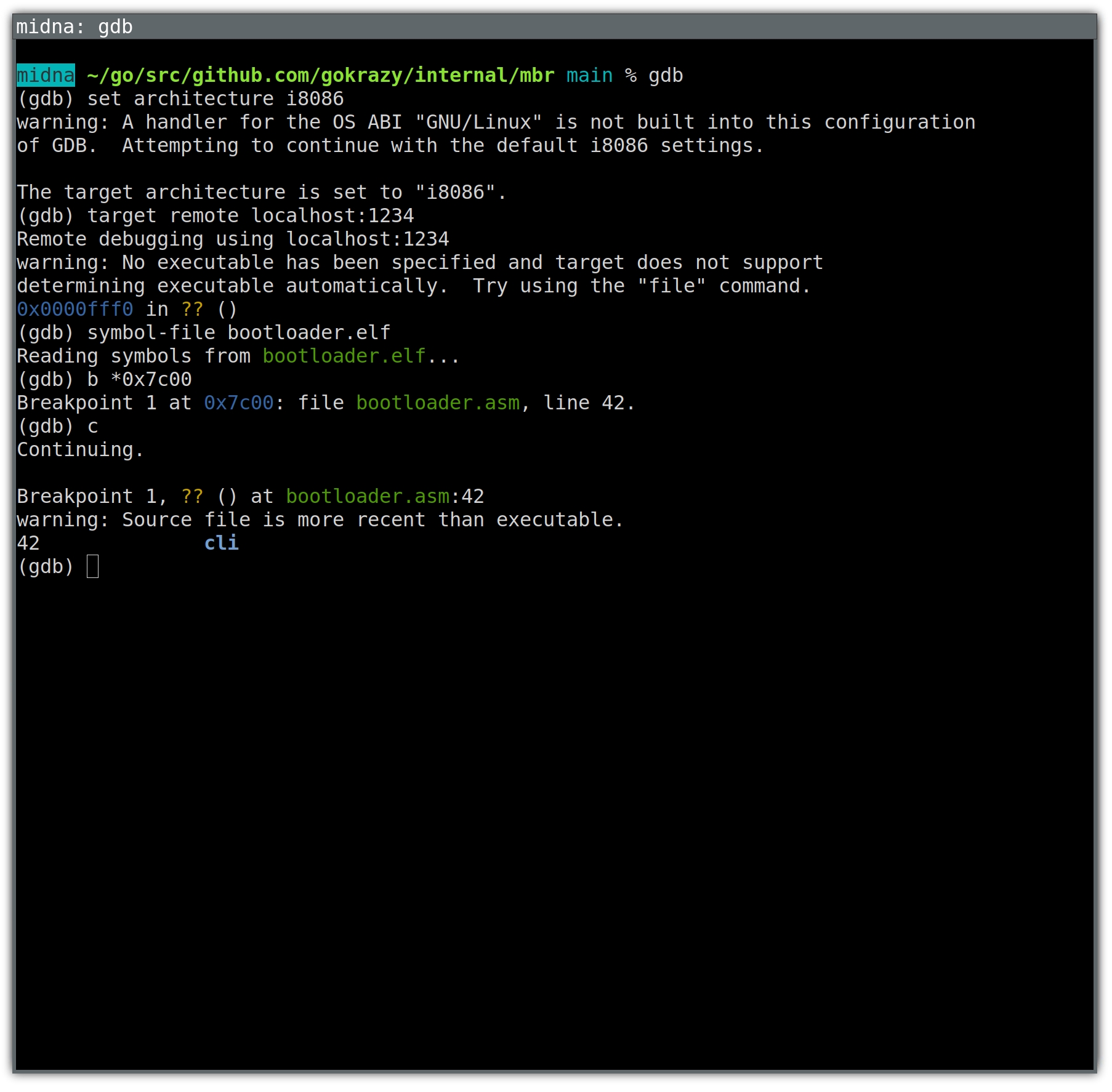
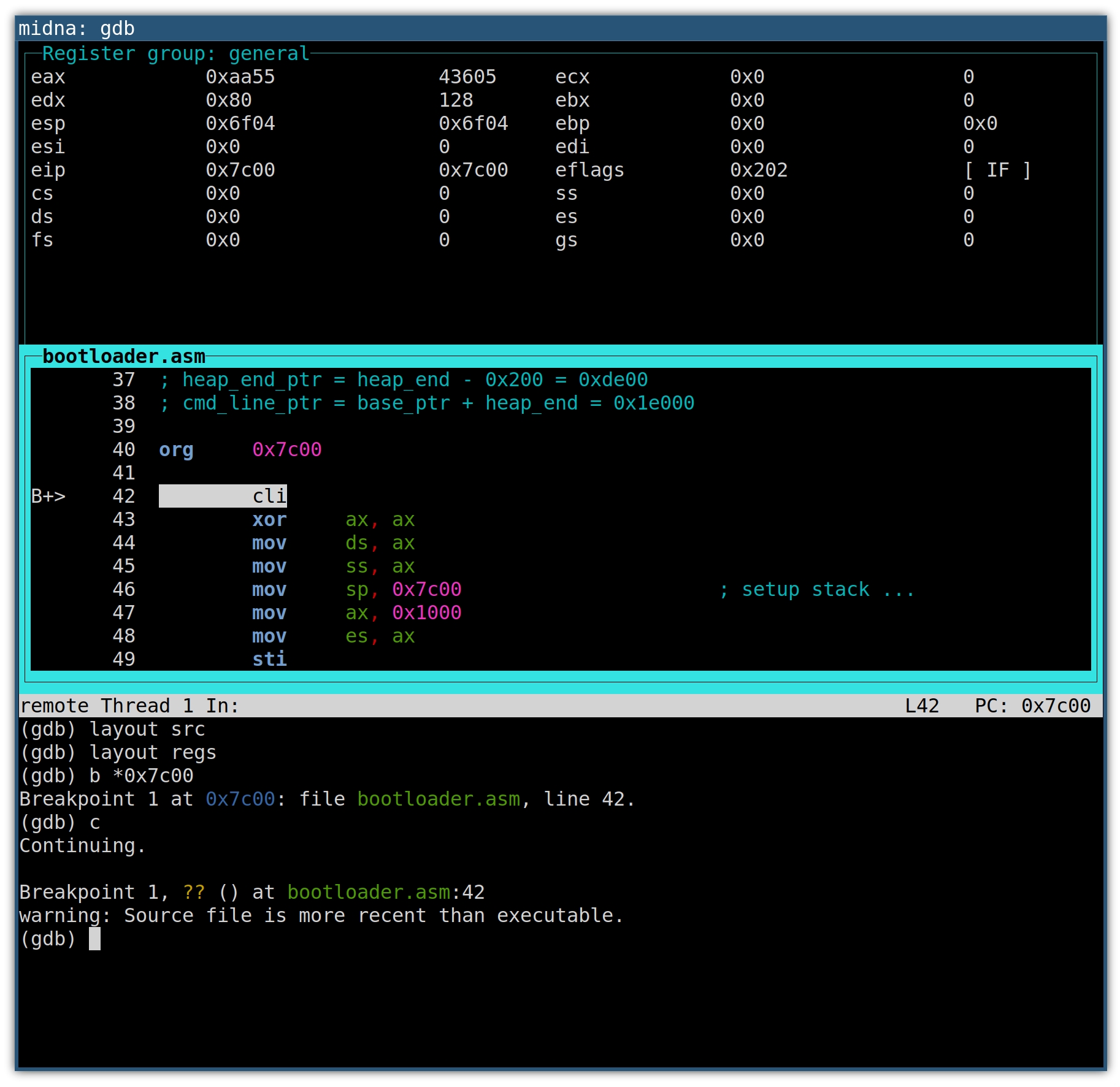
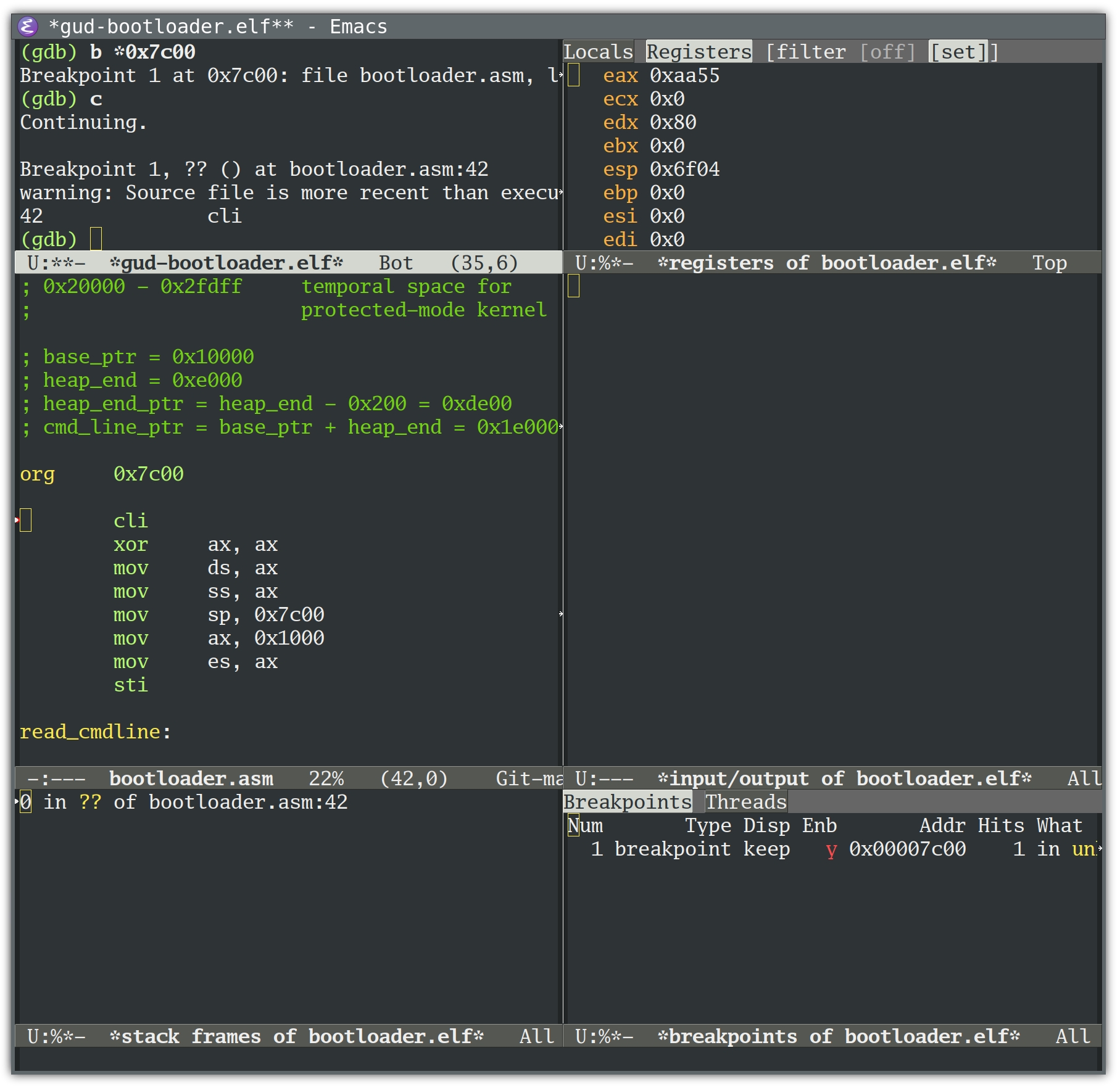
<p>Okay, so we have GDB attached to QEMU and can step through assembly
instructions. Let’s start debugging!?</p>
<p>Not so fast. There is another Tooling Level Up we need first: debug
symbols. Yes, even for a Minimal Linux Bootloader, which doesn’t use any
libraries or local variables. Having proper names for functions, as well as line
numbers, will be hugely helpful in just a second.</p>
<p>Before debug symbols, I would directly build the bootloader using <code>nasm bootloader.asm</code>, but to end up with a symbol file for GDB, we need to instruct
<code>nasm</code> to generate an ELF file with debug symbols, then use <code>ld</code> to link it and
finally use <code>objcopy</code> to copy the code out of the ELF file again.</p>
<p>After <a href="https://github.com/gokrazy/internal/commit/d29c615f07b8e2632e2178b77d2d3d43dec9d46c">commit
d29c615</a>
in <code>gokrazy/internal/mbr</code>, I have <code>bootloader.elf</code>.</p>
<p>Back in GDB, we can load the symbols using the <code>symbol-file</code> command:</p>
<pre tabindex="0"><code>(gdb) set architecture i8086
The target architecture is set to &#34;i8086&#34;.
(gdb) target remote localhost:1234
Remote debugging using localhost:1234
0x0000fff0 in ?? ()
(gdb) symbol-file bootloader.elf
Reading symbols from bootloader.elf...
(gdb) break *0x7c00
Breakpoint 1 at 0x7c00: file bootloader.asm, line 48.
(gdb) continue
Continuing.

Breakpoint 1, ?? () at bootloader.asm:48
48		cli
(gdb)
</code></pre><h2 id="automation-with-gdbinit">Automation with .gdbinit</h2>
<p>At this point, we need 4 commands each time we start GDB. We can automate these
by writing them to a <code>.gdbinit</code> file:</p>
<pre tabindex="0"><code>% cat &gt; .gdbinit &lt;&lt;&#39;EOT&#39;
set architecture i8086
target remote localhost:1234
symbol-file bootloader.elf
break *0x7c00
EOT

% gdb
The target architecture is set to &#34;i8086&#34;.
0x0000fff0 in ?? ()
Breakpoint 1 at 0x7c00: file bootloader.asm, line 48.
(gdb) 
</code></pre><h2 id="understanding-program-flow">Understanding program flow</h2>
<p>The easiest way to understand program flow seems to be to step through the program.</p>
<p>But Minimal Linux Bootloader (MLB) contains loops that run through thousands of
iterations. You can’t use gdb’s <code>stepi</code> command with that.</p>
<p>Because MLB only contains a few functions, I eventually realized that placing a
breakpoint on each function would be the quickest way to understand the
high-level program flow:</p>
<pre tabindex="0"><code>(gdb) b read_kernel_setup
Breakpoint 2 at 0x7c38: file bootloader.asm, line 75.
(gdb) b check_version
Breakpoint 3 at 0x7c56: file bootloader.asm, line 88.
(gdb) b read_protected_mode_kernel
Breakpoint 4 at 0x7c8f: file bootloader.asm, line 105.
(gdb) b read_protected_mode_kernel_2
Breakpoint 5 at 0x7cd6: file bootloader.asm, line 126.
(gdb) b run_kernel
Breakpoint 6 at 0x7cff: file bootloader.asm, line 142.
(gdb) b error
Breakpoint 7 at 0x7d51: file bootloader.asm, line 190.
(gdb) b reboot
Breakpoint 8 at 0x7d62: file bootloader.asm, line 204.
</code></pre><p>With the working kernel, we get the following transcript:</p>
<pre tabindex="0"><code>(gdb)
Continuing.

Breakpoint 2, read_kernel_setup () at bootloader.asm:75
75		xor	eax, eax
(gdb)
Continuing.

Breakpoint 3, check_version () at bootloader.asm:88
88		cmp	word [es:0x206], 0x204		; we need protocol version &gt;= 2.04
(gdb)
Continuing.

Breakpoint 4, read_protected_mode_kernel () at bootloader.asm:105
105		mov	edx, [es:0x1f4]			; edx stores the number of bytes to load
(gdb)
Continuing.

Breakpoint 5, read_protected_mode_kernel_2 () at bootloader.asm:126
126		mov	eax, edx
(gdb)
Continuing.

Breakpoint 6, run_kernel () at bootloader.asm:142
142		cli
(gdb)
</code></pre><p>With the non-booting kernel, we get:</p>
<pre tabindex="0"><code>(gdb) c
Continuing.

Breakpoint 1, ?? () at bootloader.asm:48
48		cli
(gdb)
Continuing.

Breakpoint 2, read_kernel_setup () at bootloader.asm:75
75		xor	eax, eax
(gdb)
Continuing.

Breakpoint 3, check_version () at bootloader.asm:88
88		cmp	word [es:0x206], 0x204		; we need protocol version &gt;= 2.04
(gdb)
Continuing.

Breakpoint 4, read_protected_mode_kernel () at bootloader.asm:105
105		mov	edx, [es:0x1f4]			; edx stores the number of bytes to load
(gdb)
Continuing.

Breakpoint 1, ?? () at bootloader.asm:48
48		cli
(gdb)
</code></pre><p>Okay! Now we see that the bootloader starts loading the kernel from disk into
RAM, but doesn’t actually get far enough to call <code>run_kernel</code>, meaning the
problem isn’t with stack protection, with loading a working command line or with
anything <em>inside</em> the Linux kernel.</p>
<p>This lets us rule out a large part of the problem space. We now know that we can
focus entirely on the bootloader and why it cannot load the Linux kernel into
memory.</p>
<p>Let’s take a closer look…</p>
<h2 id="wait-this-isnt-gdb">Wait, this isn’t GDB!</h2>
<p>In the example above, using breakpoints was sufficient to narrow down the problem.</p>
<p>You might think we used GDB, and it looked like this:</p>


<a href="https://michael.stapelberg.ch/posts/2024-02-11-minimal-linux-bootloader-debugging-story/2024-01-21-gdb-text.jpg"><img
  srcset="https://michael.stapelberg.ch/posts/2024-02-11-minimal-linux-bootloader-debugging-story/2024-01-21-gdb-text_hu_e53e841704bbad8e.jpg 2x,https://michael.stapelberg.ch/posts/2024-02-11-minimal-linux-bootloader-debugging-story/2024-01-21-gdb-text_hu_12be45f01fbce110.jpg 3x"
  src="https://michael.stapelberg.ch/posts/2024-02-11-minimal-linux-bootloader-debugging-story/2024-01-21-gdb-text_hu_566cfd8106263dff.jpg"
  
  width="600"
  height="589"
  style="

border: 0;

"
  
  loading="lazy"></a>


<p>But that’s not GDB! It’s an easy mistake to make. After all, GDB starts up with
just a text prompt, and as you can see from the example above, we can just enter
text and achieve a good result.</p>
<p>To see the real GDB, you need to start it up fully, meaning including its user
interface.</p>
<p>You can either use GDB’s text user interface (TUI), or a graphical user
interface for gdb, such as the one available in Emacs.</p>
<h3 id="the-gdb-text-mode-user-interface-tui">The GDB text-mode user interface (TUI)</h3>
<p>You’re already familiar with the <code>architecture</code>, <code>target</code> and <code>breakpoint</code>
commands from above. To also set up the text-mode user interface, we run a few
<code>layout</code> commands:</p>
<pre tabindex="0"><code>(gdb) set architecture i8086
(gdb) target remote localhost:1234
(gdb) symbol-file bootloader.elf
(gdb) layout split
(gdb) layout src
(gdb) layout regs
(gdb) break *0x7c00
(gdb) continue
</code></pre><p>The <code>layout split</code> command loads the text-mode user interface and splits the
screen into a register window, disassembly window and command window.</p>
<p>With <code>layout src</code> we disregard the disassembly window in favor of a source
listing window. Both are in assembly language in our case, but the source
listing contains comments as well.</p>
<p>The <code>layout src</code> command also got rid of the register window, which we’ll get
back using <code>layout regs</code>. I’m not sure if there’s an easier way.</p>
<p>The result looks like this:</p>


<a href="https://michael.stapelberg.ch/posts/2024-02-11-minimal-linux-bootloader-debugging-story/2024-01-21-gdb-featured.jpg"><img
  srcset="https://michael.stapelberg.ch/posts/2024-02-11-minimal-linux-bootloader-debugging-story/2024-01-21-gdb-featured_hu_47f2f78d59fa5cf1.jpg 2x,https://michael.stapelberg.ch/posts/2024-02-11-minimal-linux-bootloader-debugging-story/2024-01-21-gdb-featured_hu_2b9035be25bb5308.jpg 3x"
  src="https://michael.stapelberg.ch/posts/2024-02-11-minimal-linux-bootloader-debugging-story/2024-01-21-gdb-featured_hu_6b635090913012bc.jpg"
  
  width="600"
  height="583"
  style="

border: 0;

"
  
  loading="lazy"></a>


<p>The source window will highlight the next line of code that will be executed. On
the left, the <code>B+</code> marker indicates an enabled breakpoint, which will become
helpful with multiple breakpoints. Whenever a register value changes, the
register and its new value will be highlighted.</p>
<p>The up and down arrow keys scroll the source window.</p>
<p>Use <code>C-x o</code> to switch between the windows.</p>
<p>If you’re familiar with Emacs, you’ll recognize the keyboard shortcut. But as an
Emacs user, you might prefer the GDB Emacs user interface:</p>
<h3 id="the-gdb-emacs-user-interface-m-x-gdb">The GDB Emacs user interface (M-x gdb)</h3>
<p>This is <code>M-x gdb</code> with <a href="https://www.gnu.org/software/emacs/manual/html_node/emacs/GDB-User-Interface-Layout.html"><code>gdb-many-windows</code>
enabled</a>:</p>


<a href="https://michael.stapelberg.ch/posts/2024-02-11-minimal-linux-bootloader-debugging-story/2024-01-21-gdb-emacs.jpg"><img
  srcset="https://michael.stapelberg.ch/posts/2024-02-11-minimal-linux-bootloader-debugging-story/2024-01-21-gdb-emacs_hu_d89d1ec45f8765a6.jpg 2x,https://michael.stapelberg.ch/posts/2024-02-11-minimal-linux-bootloader-debugging-story/2024-01-21-gdb-emacs_hu_b44b68175d66edb5.jpg 3x"
  src="https://michael.stapelberg.ch/posts/2024-02-11-minimal-linux-bootloader-debugging-story/2024-01-21-gdb-emacs_hu_85dbec5c64f962eb.jpg"
  
  width="600"
  height="584"
  style="

border: 0;

"
  
  loading="lazy"></a>


<h2 id="debugging-the-failing-loop">Debugging the failing loop</h2>
<p>Let’s take a look at the loop that we know the bootloader is entering, but not
leaving (neither <code>read_protected_mode_kernel_2</code> nor <code>run_kernel</code> are ever called):</p>
<div class="highlight"><pre tabindex="0" style="background-color:#f0f0f0;-moz-tab-size:4;-o-tab-size:4;tab-size:4;"><code class="language-asm" data-lang="asm"><span style="display:flex;"><span><span style="color:#002070;font-weight:bold">read_protected_mode_kernel:</span>
</span></span><span style="display:flex;"><span>    <span style="color:#06287e">mov</span>  <span style="color:#60add5">edx</span>, [<span style="color:#60add5">es</span>:<span style="color:#40a070">0x1f4</span>]              <span style="color:#60a0b0;font-style:italic">; edx stores the number of bytes to load
</span></span></span><span style="display:flex;"><span><span style="color:#60a0b0;font-style:italic"></span>    <span style="color:#06287e">shl</span>  <span style="color:#60add5">edx</span>, <span style="color:#40a070">4</span>
</span></span><span style="display:flex;"><span>
</span></span><span style="display:flex;"><span><span style="color:#002070;font-weight:bold">.loop:</span>
</span></span><span style="display:flex;"><span>    <span style="color:#06287e">cmp</span>  <span style="color:#60add5">edx</span>, <span style="color:#40a070">0</span>
</span></span><span style="display:flex;"><span>    <span style="color:#06287e">je</span>   <span style="color:#60add5">run_kernel</span>
</span></span><span style="display:flex;"><span>
</span></span><span style="display:flex;"><span>    <span style="color:#06287e">cmp</span>  <span style="color:#60add5">edx</span>, <span style="color:#40a070">0xfe00</span>                  <span style="color:#60a0b0;font-style:italic">; less than 127*512 bytes remaining?
</span></span></span><span style="display:flex;"><span><span style="color:#60a0b0;font-style:italic"></span>    <span style="color:#06287e">jb</span>   <span style="color:#60add5">read_protected_mode_kernel_2</span>
</span></span><span style="display:flex;"><span>
</span></span><span style="display:flex;"><span>    <span style="color:#06287e">mov</span>  <span style="color:#60add5">eax</span>, <span style="color:#40a070">0x7f</span>                    <span style="color:#60a0b0;font-style:italic">; load 127 sectors (maximum)
</span></span></span><span style="display:flex;"><span><span style="color:#60a0b0;font-style:italic"></span>    <span style="color:#06287e">xor</span>  <span style="color:#60add5">bx</span>, <span style="color:#60add5">bx</span>                       <span style="color:#60a0b0;font-style:italic">; no offset
</span></span></span><span style="display:flex;"><span><span style="color:#60a0b0;font-style:italic"></span>    <span style="color:#06287e">mov</span>  <span style="color:#60add5">cx</span>, <span style="color:#40a070">0x2000</span>                   <span style="color:#60a0b0;font-style:italic">; load temporary to 0x20000
</span></span></span><span style="display:flex;"><span><span style="color:#60a0b0;font-style:italic"></span>    <span style="color:#06287e">mov</span>  <span style="color:#60add5">esi</span>, <span style="color:#60add5">current_lba</span>
</span></span><span style="display:flex;"><span>    <span style="color:#06287e">call</span> <span style="color:#60add5">read_from_hdd</span>
</span></span><span style="display:flex;"><span>
</span></span><span style="display:flex;"><span>    <span style="color:#06287e">mov</span>  <span style="color:#60add5">cx</span>, <span style="color:#40a070">0x7f00</span>                   <span style="color:#60a0b0;font-style:italic">; move 65024 bytes (127*512 byte)
</span></span></span><span style="display:flex;"><span><span style="color:#60a0b0;font-style:italic"></span>    <span style="color:#06287e">call</span> <span style="color:#60add5">do_move</span>
</span></span><span style="display:flex;"><span>
</span></span><span style="display:flex;"><span>    <span style="color:#06287e">sub</span>  <span style="color:#60add5">edx</span>, <span style="color:#40a070">0xfe00</span>                  <span style="color:#60a0b0;font-style:italic">; update the number of bytes to load
</span></span></span><span style="display:flex;"><span><span style="color:#60a0b0;font-style:italic"></span>    <span style="color:#06287e">add</span>  <span style="color:#60add5">word</span> [<span style="color:#60add5">gdt.dest</span>], <span style="color:#40a070">0xfe00</span>
</span></span><span style="display:flex;"><span>    <span style="color:#06287e">adc</span>  <span style="color:#60add5">byte</span> [<span style="color:#60add5">gdt.dest</span><span style="">+</span><span style="color:#40a070">2</span>], <span style="color:#40a070">0</span>
</span></span><span style="display:flex;"><span>    <span style="color:#06287e">jmp</span>  <span style="color:#60add5">short</span> <span style="color:#60add5">read_protected_mode_kernel.loop</span>
</span></span></code></pre></div><p>The comments explain that the code loads chunks of FE00h == 65024 (127*512)
bytes at a time.</p>
<p>Loading means calling <code>read_from_hdd</code>, then <code>do_move</code>. Let’s take a look at <code>do_move</code>:</p>
<div class="highlight"><pre tabindex="0" style="background-color:#f0f0f0;-moz-tab-size:4;-o-tab-size:4;tab-size:4;"><code class="language-asm" data-lang="asm"><span style="display:flex;"><span><span style="color:#002070;font-weight:bold">do_move:</span>
</span></span><span style="display:flex;"><span>    <span style="color:#06287e">push</span> <span style="color:#60add5">edx</span>
</span></span><span style="display:flex;"><span>    <span style="color:#06287e">push</span> <span style="color:#60add5">es</span>
</span></span><span style="display:flex;"><span>    <span style="color:#06287e">xor</span>  <span style="color:#60add5">ax</span>, <span style="color:#60add5">ax</span>
</span></span><span style="display:flex;"><span>    <span style="color:#06287e">mov</span>  <span style="color:#60add5">es</span>, <span style="color:#60add5">ax</span>
</span></span><span style="display:flex;"><span>    <span style="color:#06287e">mov</span>  <span style="color:#60add5">ah</span>, <span style="color:#40a070">0x87</span>
</span></span><span style="display:flex;"><span>    <span style="color:#06287e">mov</span>  <span style="color:#60add5">si</span>, <span style="color:#60add5">gdt</span>
</span></span><span style="display:flex;"><span>    <span style="color:#06287e">int</span>  <span style="color:#40a070">0x15</span>     <span style="color:#60a0b0;font-style:italic">; line 182
</span></span></span><span style="display:flex;"><span><span style="color:#60a0b0;font-style:italic"></span>    <span style="color:#06287e">jc</span>   <span style="color:#60add5">error</span>
</span></span><span style="display:flex;"><span>    <span style="color:#06287e">pop</span>  <span style="color:#60add5">es</span>
</span></span><span style="display:flex;"><span>    <span style="color:#06287e">pop</span>  <span style="color:#60add5">edx</span>
</span></span><span style="display:flex;"><span>    <span style="color:#06287e">ret</span>
</span></span></code></pre></div><p><code>int 0x15</code> is a call to the BIOS Service Interrupt, which will dispatch the call
based on <code>AH == 87H</code> to the <a href="http://www.techhelpmanual.com/222-int_15h_87h__move_memory_block.html">Move Memory Block
(techhelpmanual.com)</a>
function.</p>
<p>This function moves the specified amount of memory (65024 bytes in our case)
from source/destination addresses specified in a Global Descriptor Table (GDT)
record.</p>
<p>We can use GDB to show the addresses of each of <code>do_move</code>’s memory move calls by
telling it to stop at line 182 (the <code>int 0x15</code> instruction) and print the GDT
record’s destination descriptor:</p>
<pre tabindex="0"><code>(gdb) break 182
Breakpoint 2 at 0x7d49: file bootloader.asm, line 176.

(gdb) command 2
Type commands for breakpoint(s) 2, one per line.
End with a line saying just &#34;end&#34;.
&gt;x/8bx gdt+24
&gt;end

(gdb) continue
Continuing.

Breakpoint 1, ?? () at bootloader.asm:48
42		cli

(gdb)
Continuing.

Breakpoint 2, do_move () at bootloader.asm:182
182		int	0x15
0x7d85:	0xff	0xff	0x00	0x00	0x10	0x93	0x00	0x00

(gdb)
Continuing.

Breakpoint 2, do_move () at bootloader.asm:182
182		int	0x15
0x7d85:	0xff	0xff	0x00	0xfe	0x10	0x93	0x00	0x00

(gdb)
</code></pre><p>The destination address is stored in byte <code>2..4</code>. Remember to read these little
endian entries “back to front”.</p>
<ul>
<li>
<p>Address #1 is <code>0x100000</code>.</p>
</li>
<li>
<p>Address #2 is <code>0x10fe00</code>.</p>
</li>
</ul>
<p>If we press Return long enough, we eventually end up here:</p>
<pre tabindex="0"><code>Breakpoint 2, do_move () at bootloader.asm:182
182		int	0x15
0x7d85:	0xff	0xff	0x00	0x1e	0xff	0x93	0x00	0x00
(gdb)
Continuing.

Breakpoint 2, do_move () at bootloader.asm:182
182		int	0x15
0x7d85:	0xff	0xff	0x00	0x1c	0x00	0x93	0x00	0x00

(gdb)
Continuing.

Breakpoint 1, ?? () at bootloader.asm:48
42		cli
(gdb)

Program received signal SIGTRAP, Trace/breakpoint trap.
0x000079b0 in ?? ()
(gdb)
</code></pre><p>Now that execution left the bootloader, let’s take a look at the last <code>do_move</code>
call parameters: We notice that the destination address overflowed its 24 byte
data type:</p>
<ul>
<li>Address #y is <code>0xff1e00</code></li>
<li>Address #z is <code>0x001c00</code></li>
</ul>
<h2 id="root-cause">Root cause</h2>
<p>At this point I reached out to Sebastian again to ask him if there was an
(undocumented) fundamental architectural limit to his Minimal Linux Bootloader —
with 24 bit addresses, you can address at most 16 MB of memory.</p>
<p>He replied explaining that he didn’t know of this limit either! He then linked
to <a href="http://www.techhelpmanual.com/222-int_15h_87h__move_memory_block.html">Move Memory Block
(techhelpmanual.com)</a>
as proof for the 24 bit limit.</p>
<h3 id="speculation">Speculation</h3>
<p>So, is it impossible to load larger kernels into memory from Real Mode? I’m not
sure.</p>
<p>The current bootloader code prepares a GDT in which addresses are 24 bits long
at most. But note that the techhelpmanual.com documentation that Sebastian
referenced is apparently for the <a href="https://en.wikipedia.org/wiki/Intel_80286">Intel
286</a> (a 16 bit CPU), and some of the
GDT bytes are declared reserved.</p>
<p>Today’s CPUs are <a href="https://en.wikipedia.org/wiki/I386">Intel 386</a>-compatible (a
32 bit CPU), which seems to use one of the formerly reserved bytes to represent
bit <code>24..31</code> of the address, meaning we might be able to pass 32 bit addresses
to BIOS functions in a GDT after all!</p>
<p>I wasn’t able to find clear authoritative documentation on the Move Memory Block
API on 386+, or whether BIOS functions in general are just expected to work with 32 bit addresses.</p>
<p>But Microsoft’s 1989 <a href="https://github.com/MikeyG/himem/blob/e041532abee44d663067dc6c2b782e459081fa14/oemsrc/xm386.asm#L12">HIMEM.SYS source contains a
struct</a>
that documents this 32-bit descriptor usage. A more modern reference is this
<a href="https://sys.cs.fau.de/extern/lehre/ws23/bs/uebung/seminar/boot.pdf">Operating Systems Class from FAU
2023</a> (page
71/72).</p>
<p>Hence I’m <em>thinking</em> that most BIOS implementations should actually support 32
bit addresses for their Move Memory Block implementation — provided you fill the
descriptor accordingly.</p>
<p>If that doesn’t work out, there’s also <a href="https://www.os2museum.com/wp/a-brief-history-of-unreal-mode/">“Unreal
Mode”</a>, which
allows using up to 4 GB in Real Mode, but is a change that is a lot more
complicated. See also <a href="https://blogsystem5.substack.com/p/beyond-the-1-mb-barrier-in-dos">Julio Merino’s “Beyond the 1 MB barrier in DOS”
post</a> to get
an idea of the amount of code needed.</p>
<h3 id="update-a-fix">Update: a fix!</h3>
<p><a href="https://lobste.rs/s/kaj3c2/minimal_linux_bootloader_debugging#c_ybraf4">Lobsters reader abbeyj pointed
out</a>
that the following code change should fix the truncation and result in a GDT
with all address bits in the right place:</p>
<div class="highlight"><pre tabindex="0" style="background-color:#f0f0f0;-moz-tab-size:4;-o-tab-size:4;tab-size:4;"><code class="language-diff" data-lang="diff"><span style="display:flex;"><span><span style="color:#a00000">--- i/mbr/bootloader.asm
</span></span></span><span style="display:flex;"><span><span style="color:#a00000"></span><span style="color:#00a000">+++ w/mbr/bootloader.asm
</span></span></span><span style="display:flex;"><span><span style="color:#00a000"></span><span style="color:#800080;font-weight:bold">@@ -119,6 +119,7 @@ read_protected_mode_kernel:
</span></span></span><span style="display:flex;"><span><span style="color:#800080;font-weight:bold"></span> 	sub	edx, 0xfe00			; update the number of bytes to load
</span></span><span style="display:flex;"><span> 	add	word [gdt.dest], 0xfe00
</span></span><span style="display:flex;"><span> 	adc	byte [gdt.dest+2], 0
</span></span><span style="display:flex;"><span><span style="color:#00a000">+	adc	byte [gdt.dest+5], 0
</span></span></span><span style="display:flex;"><span><span style="color:#00a000"></span> 	jmp	short read_protected_mode_kernel.loop
</span></span><span style="display:flex;"><span>
</span></span><span style="display:flex;"><span> read_protected_mode_kernel_2:
</span></span></code></pre></div><p>…and indeed, in my first test this seems to fix the problem! It’ll take me a
little while to clean this up and submit it. You can follow <a href="https://github.com/gokrazy/gokrazy/issues/248">gokrazy issue
#248</a> if you’re interested.</p>
<h2 id="bonus-reading-bios-source">Bonus: reading BIOS source</h2>
<p>There are actually a couple of BIOS implementations that we can look into to get
a better understanding of how Move Memory Block works.</p>
<p>We can look at <a href="https://en.wikipedia.org/wiki/DOSBox">DOSBox</a>, an open source
DOS emulator. Its <a href="https://sourceforge.net/p/dosbox/code-0/HEAD/tree/dosbox/branches/0_74_3/src/ints/bios.cpp#l663">Move Memory Block
implementation</a>
does seem to support 32 bit addresses:</p>
<div class="highlight"><pre tabindex="0" style="background-color:#f0f0f0;-moz-tab-size:4;-o-tab-size:4;tab-size:4;"><code class="language-c" data-lang="c"><span style="display:flex;"><span>PhysPt dest	<span style="color:#666">=</span> (<span style="color:#06287e">mem_readd</span>(data<span style="color:#666">+</span><span style="color:#40a070">0x1A</span>) <span style="color:#666">&amp;</span> <span style="color:#40a070">0x00FFFFFF</span>) <span style="color:#666">+</span>
</span></span><span style="display:flex;"><span>              (<span style="color:#06287e">mem_readb</span>(data<span style="color:#666">+</span><span style="color:#40a070">0x1E</span>)<span style="color:#666">&lt;&lt;</span><span style="color:#40a070">24</span>);
</span></span></code></pre></div><p>Another implementation is <a href="https://www.seabios.org/SeaBIOS">SeaBIOS</a>. Contrary
to DOSBox, SeaBIOS is not just used in emulation: The PC Engines apu uses
coreboot with SeaBIOS. QEMU also uses SeaBIOS.</p>
<p><a href="https://github.com/qemu/seabios/blob/ea1b7a0733906b8425d948ae94fba63c32b1d425/src/system.c#L72">The SeaBIOS <code>handle_1587</code> source
code</a>
is a little harder to follow, because it requires knowledge of Real Mode
assembly. The way I read it, SeaBIOS doesn’t truncate or otherwise modify the
descriptors and just passes them to the CPU. On 386 or newer, 32 bit addresses
should work.</p>
<h2 id="mitigation">Mitigation</h2>
<p>While it’s great to understand the limitation we’re running into, I wanted to
unblock the pull request as quickly as possible, so I needed a quick mitigation
instead of investigating if <a href="#speculation">my speculation</a> can be developed into
a proper fix.</p>
<p>When I started router7, we didn’t support loadable kernel modules, so everything
had to be compiled into the kernel. We now do support loadable kernel modules,
so I could have moved functionality into modules.</p>
<p>Instead, I found an even easier quick fix: <a href="https://github.com/rtr7/kernel/commit/304a623297fe3b7ae303811ac097c01fcca901e0">switching from gzip to zstd
compression</a>. This
saved about 1.8 MB and will buy us some time to implement a proper fix while
unblocking automated new Linux kernel version merges.</p>
<h2 id="conclusion">Conclusion</h2>
<p>I wanted to share this debugging story because it shows a couple of interesting lessons:</p>
<ol>
<li>
<p>Being able to run older versions of various parts of your software stack is a
very valuable debugging tool. It helped us isolate a trigger for the bug
(using an older GCC) and it helped us set up a debugging environment (using
an older QEMU).</p>
</li>
<li>
<p>Setting up a debugger can be annoying (symbol files, learning the UI) but
it’s <em>so worth it</em>.</p>
</li>
<li>
<p>Be on the lookout for wrong turns during debugging. Write down every
conclusion and challenge it.</p>
</li>
<li>
<p>The BIOS can seem mysterious and “too low level” but there are many blog
posts, lectures and tutorials. You can also just read open-source BIOS code
to understand it much better.</p>
</li>
</ol>
<p>Enjoy poking at your BIOS!</p>
<h2 id="appendix-resources">Appendix: Resources</h2>
<p>I found the following resources helpful:</p>
<ul>
<li><a href="https://0xax.gitbook.io/linux-insides/summary/booting/linux-bootstrap-1">linux-insides: From bootloader to kernel</a></li>
<li><a href="https://www.pcjs.org/documents/books/mspl13/msdos/encyclopedia/section2/">The MS-DOS Encyclopedia</a></li>
<li><a href="https://www.youtube.com/watch?v=0q6Ujn_zNH8">Ben Eater: A simple BIOS for my breadboard computer (22 minutes)</a></li>
</ul>
]]></content>
  </entry>
</feed>